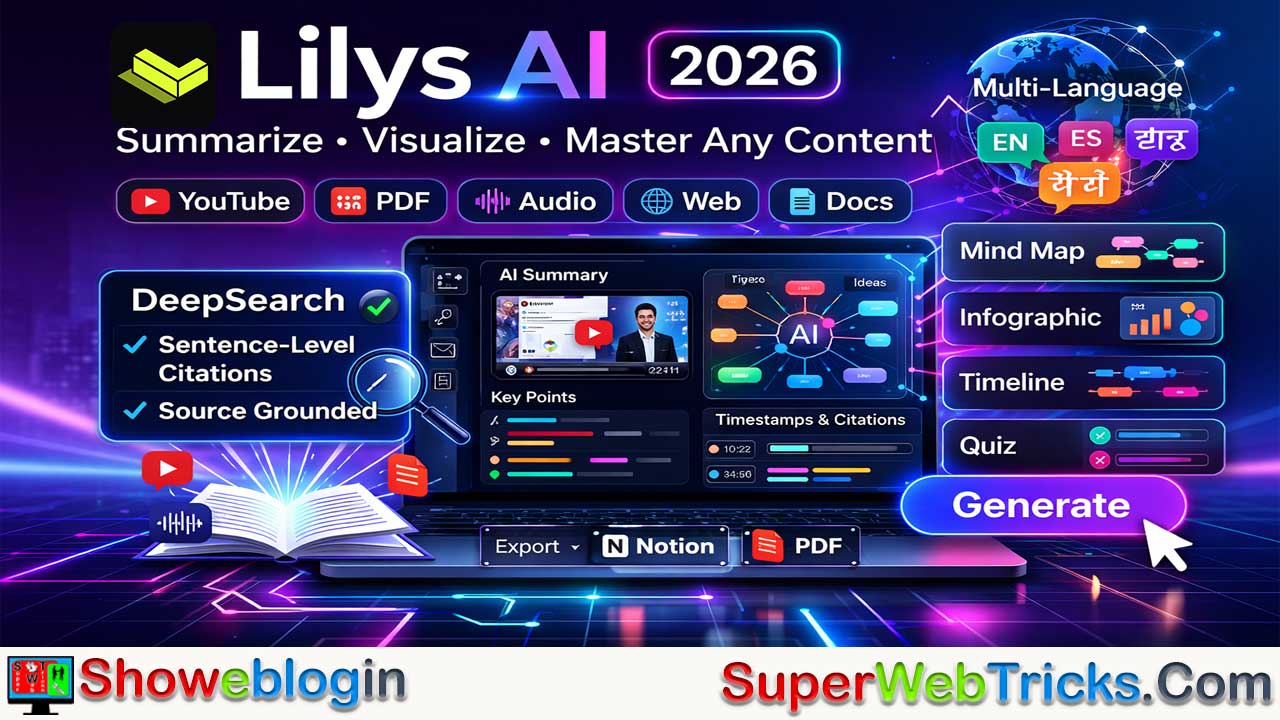




Lilys AI is a multimodal AI-powered summarization and research workspace designed to combat “information obesity” by transforming long videos, audio, documents, and web content into structured, source-grounded insights with sentence-level citations and timestamps.
Evolving beyond its origins as a YouTube summarizer, it now supports diverse inputs (videos, audio files, PDFs, websites, raw text), generates visual outputs like mind maps, infographics, timelines, and quizzes, and emphasizes transparency through its DeepSearch feature that links every claim back to exact source locations.
With strong multi-language capabilities, agentic workflows, and integrations such as Notion exports, Lilys AI positions itself as a productivity and research hub for students, creators, professionals, and lifelong learners, distinguishing itself through speed, visual thinking tools, and verifiable summaries.
| Category | Details |
|---|---|
| Product Name | Lilys AI |
| Website | lilys.ai |
| Primary Function | Multimodal AI summarization & research workspace |
| Best Known For | YouTube video summaries with timestamps & citations |
| Core Strength | Source-grounded summaries with sentence-level references |
| Supported Inputs | YouTube links, video/audio files (MP4, MP3, WAV), PDFs, DOCX, websites, raw text |
| Output Formats | Structured summaries, mind maps, infographics, timeline notes, quizzes/flashcards |
| Unique Feature | DeepSearch (timestamped & source-linked citations) |
| Languages Supported | 50+ languages (transcription & translation) |
| Assistant Capabilities | Follow-up Q&A, extraction, rewriting, formatting tasks |
| Ideal Users | Students, researchers, creators, business professionals |
| Integrations | Notion export, PDF export, browser extension |
| Pricing (Entry) | Free plan available |
| Differentiator | Faster & more visual than typical summarizers |
| Common Confusion | Not the same as lily.ai (retail AI company) |
Lilys AI Review 2026: Multimodal YouTube & PDF Summarizer with DeepSearch Citations
The world of digital content is a firehose, and Lilys AI is essentially the high-performance filter we’ve all been waiting for. If you’ve ever stared at a two-hour YouTube podcast or a 50-page PDF with a sense of impending doom, this tool is designed for you.
Lilys AI (lilys.ai) has evolved significantly in early 2026, transitioning from a simple YouTube summarizer into a robust multimodal research and productivity hub. It is designed to solve “information obesity” by distilling massive amounts of video, audio, and text into structured, actionable insights.
What is Lilys AI?
Lilys AI is an AI-powered summarization and research workspace. While many tools simply “summarize,” Lilys AI focuses on source-grounded intelligence. It doesn’t just tell you what happened; it shows you exactly where in the video or document the information lives, using sentence-level citations and timestamps.
Core Capabilities
- YouTube Mastery: Turn any video link into a structured report with timestamps and screenshots.
- Multimodal Ingestion: It processes YouTube links, local video/audio files, PDFs, websites, and raw text.
- Visual Thinking: Beyond bullet points, it can generate mind maps, infographics, and diagrams to help you visualize complex topics.
- Multi-Language Support: Supporting over 50 languages, it can summarize a foreign-language lecture into your native tongue with surprising nuance.
Key Features & 2026 Updates
1. Multimodal Input Support
While it gained fame for its YouTube summarization, Lilys AI now processes a wide array of sources:
- Video & Audio: Direct links or file uploads (MP4, MP3, WAV). It provides real-time transcription and translation in 50+ languages.
- Documents: PDFs (including complex academic papers), DOCX, and plain text.
- Web Clipper: A dedicated Chrome extension that “scraps” and summarizes articles or entire websites with one click.
2. Advanced Visual Outputs
Unlike text-only competitors, Lilys AI offers diverse visual formats to suit different learning styles:
- Mind Maps: Automatically generates hierarchical diagrams to show how ideas connect.
- Infographics: Uses the Nano Banana (Gemini 2.5 Flash) model to create visual summaries suitable for social media or presentations.
- Timeline Notes: Perfect for historical content or project meetings, organizing information chronologically with timestamps.
- Quiz Generation: Turns any source into a set of flashcards or multiple-choice questions for active recall.
3. “DeepSearch” & Source Grounding
To combat AI hallucinations, Lilys AI introduced DeepSearch. This feature:
- Provides sentence-level citations that link directly to the exact second in a video or the specific line in a PDF.
- Cross-references information with external trusted sources to verify facts.
- Uses “Deep Insight” reports to move beyond simple summaries and offer critical analysis and “Explain Like I’m 5” (ELI5) modes.
Most summarizers give you a generic “TL;DR.” Lilys AI provides a hierarchical breakdown. You get a high-level summary, followed by detailed sections with bolded key terms. If a point interests you, you can “unfold” the original script to verify the context instantly.
Once a report is generated, you can use the Lily AI Assistant to ask follow-up questions.
Example: “Based on this hour-long interview, what were the three specific mistakes the founder made in their first year?”
Pricing Tiers (2026)
| Plan | Price (Monthly) | Key Highlights |
|---|---|---|
| Free | $0 | Unlimited reports, basic LLM models, 10 Speed Boosts/mo. |
| Starter | $6.99 | Advanced model access, exports to Notion/PDF, 50 Speed Boosts. |
| Basic | $17.99 | Most Popular. High-tier LLMs, unlimited advanced features, 1,000 Speed Boosts. |
| Pro | $59.99 | Unlimited Speed Boosts, priority for large file uploads (up to 2GB). |
| Business | $27.99 /user | Team shared workspaces, centralized billing, and coming-soon SOC2 security. |
Advanced Workflows
- The “Notion Sync”: Many users leverage Lilys AI to summarize a 3-hour podcast, generate a mind map, and then export the entire structured note directly into their Notion Second Brain for long-term storage.
- Foreign Language Research: You can input a Korean tech vlog or a German research paper; the AI will summarize it in English (or your preferred language) while maintaining the original context.
- Agentic Chat: The “Lily” assistant isn’t just a chatbot—it’s an agent. You can ask it to “Extract all mentions of $X$ variable and format them into a table,” or “Rewrite this summary into a 5-tweet thread.”
Lilys AI vs. NotebookLM
While Google’s NotebookLM is excellent for grounded research on uploaded documents, Lilys AI excels in web-first workflows. It is significantly faster at handling YouTube URLs and provides more varied output formats (like timelines and infographics) compared to NotebookLM’s focus on “Deep Dives” and Audio Overviews.
Note on Confusion: Ensure you are using lilys.ai. There is a separate company called Lily AI (lily.ai) that focuses on retail e-commerce data. Lilys AI (with the “s”) is your productivity companion.
Who is Lilys AI for?
- Students & Researchers: Turn a semester’s worth of recorded lectures into a searchable, cited knowledge base.
- Content Creators: Quickly extract the “meat” of a competitor’s video to find gaps or inspiration for your own scripts.
- Business Leaders: Digest industry webinars and 1:1 meeting recordings without losing hours to playback.
- Curious Minds: Keep up with podcasts like Huberman Lab or Lex Fridman by reading the key takeaways in 5 minutes.
The Verdict
Lilys AI is a “quality-first” summarizer. Its greatest strength is transparency—the fact that every claim is linked to a timestamp or a specific line in a PDF makes it much more reliable than a standard chatbot that might “hallucinate” details.
If you prefer visual learning, the Mind Map feature alone makes it worth a try. It transforms a linear video into a web of ideas, which is significantly better for long-term retention.
FAQs about Lilys AI
What is Lilys AI?
Lilys AI is a multimodal AI-powered summarization and research workspace that converts videos, audio, documents, and web pages into structured, source-cited insights.
How is Lilys AI different from typical summarizers?
Unlike basic TL;DR tools, Lilys AI provides sentence-level citations, timestamps, and visual outputs, allowing users to verify exactly where information comes from.
What types of content can Lilys AI process?
It supports YouTube links, uploaded video/audio files, PDFs, DOCX documents, websites, and raw text.
Does Lilys AI only work with YouTube videos?
No, while it is well known for YouTube summaries, it also handles audio files, documents, and web content.
What is DeepSearch in Lilys AI?
DeepSearch is a feature that grounds summaries by linking claims directly to timestamps in videos or specific lines in documents.
Does Lilys AI reduce AI hallucinations?
Yes, its citation-based system and source grounding are designed to improve reliability and minimize fabricated information.
Can Lilys AI generate visual outputs?
Yes, it can create mind maps, infographics, timelines, and other visual summaries.
What is the Mind Map feature used for?
Mind maps visually organize ideas and relationships, making complex topics easier to understand and remember.
Can Lilys AI create quizzes or flashcards?
Yes, it can automatically generate quizzes and flashcards for active recall and study purposes.
Does Lilys AI support multiple languages?
Yes, it supports transcription, translation, and summarization in over 50 languages.
Can Lilys AI summarize foreign-language videos?
Yes, users can input content in one language and receive summaries in another.
Is Lilys AI useful for students?
Yes, students often use it to summarize lectures, research papers, and educational videos.
How can researchers benefit from Lilys AI?
Researchers can quickly extract key insights from long videos, papers, and web sources with verifiable citations.
Can content creators use Lilys AI?
Yes, creators use it to analyze competitor videos, extract ideas, and speed up research workflows.
Is Lilys AI helpful for business professionals?
Yes, it can summarize meetings, webinars, interviews, and industry reports efficiently.
Can Lilys AI handle long videos?
Yes, it is designed to process lengthy podcasts, lectures, and recordings.
Does Lilys AI provide timestamps in summaries?
Yes, summaries include timestamps that link back to precise moments in the source.
Can users verify information inside Lilys AI reports?
Yes, users can unfold the original script or navigate directly to cited sections.
What file formats does Lilys AI support for uploads?
Common formats include MP4, MP3, WAV, PDFs, DOCX, and plain text.
Does Lilys AI offer browser integration?
Yes, it provides a Chrome extension for clipping and summarizing web content.
Can Lilys AI export summaries?
Yes, users can export outputs to Notion or PDF depending on their plan.
What is the Lily AI Assistant?
It is an AI agent within the platform that answers follow-up questions and performs structured tasks on summaries.
Can the assistant perform data extraction tasks?
Yes, it can extract themes, variables, and structured information from analyzed content.
Is Lilys AI suitable for knowledge management workflows?
Yes, many users integrate it into systems like Notion for long-term storage and retrieval.
Does Lilys AI work in real time?
It offers fast processing and transcription depending on content size and plan features.
Is there a free plan for Lilys AI?
Yes, Lilys AI offers a free tier with core functionality.
What are Speed Boosts in Lilys AI?
Speed Boosts are usage-based credits that accelerate processing or enable advanced features depending on the plan.
Which Lilys AI plan is most popular?
The Basic plan is commonly positioned as the most popular for advanced features.
Can teams use Lilys AI collaboratively?
Yes, the Business plan provides team workspaces and shared access.
Is Lilys AI the same as Lily AI (lily.ai)?
No, Lily AI is a separate company focused on retail and e-commerce data.
Is Lilys AI accurate for research use?
Its source-grounded design improves trustworthiness, though users should still apply critical judgment.
Can Lilys AI summarize academic PDFs?
Yes, it is designed to handle complex documents, including research papers.
Does Lilys AI support audio-only content?
Yes, audio files such as podcasts and interviews can be processed.
Can Lilys AI create timeline-based notes?
Yes, timeline outputs organize information chronologically with references.
Does Lilys AI replace watching videos entirely?
It can significantly reduce viewing time, but some users still review source segments for deeper context.
Is Lilys AI good for podcast listeners?
Yes, it is particularly useful for extracting key insights from long-form audio content.
Does Lilys AI store original files?
Storage behavior depends on the platform’s policies and user settings.
Can Lilys AI be used for quick learning?
Yes, structured summaries and visuals make it effective for rapid comprehension.
Is Lilys AI beginner-friendly?
Yes, its interface is designed for non-technical users.
Does Lilys AI require technical expertise?
No, most features are accessible without advanced technical knowledge.
Can Lilys AI help with productivity?
Yes, it reduces the time needed to digest large volumes of information.
Does Lilys AI support structured reports?
Yes, outputs are typically organized hierarchically rather than as simple bullet points.
Is Lilys AI suitable for visual learners?
Yes, visual outputs like mind maps and infographics cater to visual thinking styles.
Can Lilys AI analyze interviews?
Yes, interviews and discussions are common use cases.
Does Lilys AI work for webinars?
Yes, webinars can be summarized like other video sources.
Can Lilys AI summarize websites?
Yes, entire pages or clipped articles can be processed.
Is Lilys AI useful for lifelong learners?
Yes, it helps curious users keep up with educational and informational content.
Does Lilys AI generate screenshots from videos?
Yes, video reports may include screenshots tied to timestamps.
Can Lilys AI assist with content rewriting?
Yes, the assistant can rewrite summaries into different formats like threads or posts.
Does Lilys AI compete with NotebookLM?
Yes, both serve research workflows, though Lilys AI is often noted for faster video handling and visual outputs.
Is Lilys AI a research tool or a summarizer?
It functions as both, combining summarization with structured analysis and source verification.











Leave a Reply
You must be logged in to post a comment.