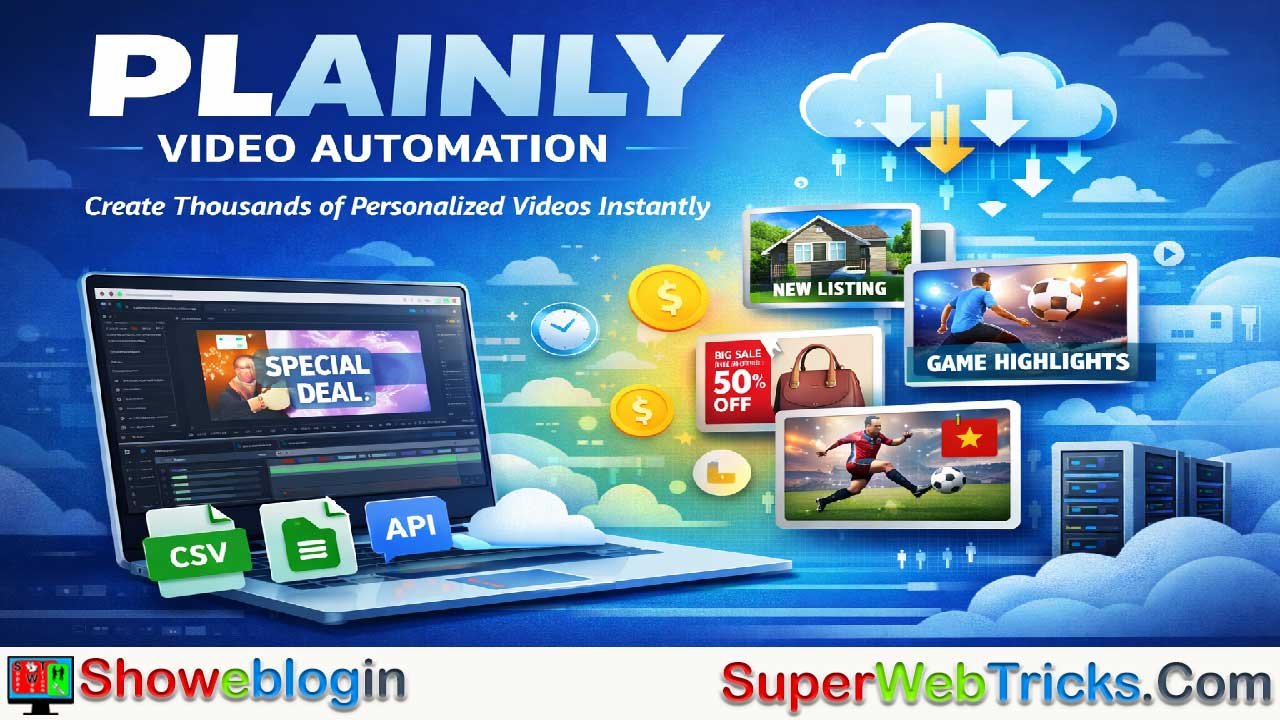






Plainly is a cloud-based video automation platform that lets teams create thousands of personalized, high-quality videos by building a single Adobe After Effects template and automatically populating it with data from CSVs, Google Sheets, APIs, or integrations, rendering everything at scale in the cloud.
Positioned as “mail merge for video,” Plainly addresses the 2026 demand for hyper-personalized, data-driven video content by dramatically reducing production time (up to 85%), costs (around 70%), and manual effort while increasing output and engagement.
Its After Effects–native approach, API-first architecture, unlimited cloud rendering, and deep automation integrations make it especially powerful for marketing agencies, sports broadcasters, real estate, e-commerce, and personalized video campaigns, though it does require After Effects expertise and structured data. For organizations producing videos regularly and at scale, Plainly delivers strong ROI within months and effectively removes the bottleneck between creative design and mass video production.
| Category | Details |
|---|---|
| Platform Type | Cloud-based video automation |
| Core Function | Creates thousands of videos from one After Effects template |
| Template Tool | Adobe After Effects (AE 2020+) |
| Data Sources | CSV, Google Sheets, API, Airtable, Zapier, Make |
| Rendering | Cloud rendering at scale (no local load) |
| Output Formats | MP4, MOV, WebM, ProRes, up to 4K |
| Best For | Marketing, real estate, sports, e-commerce, personalization |
| Key Benefit | Massive time and cost savings |
| Skill Requirement | After Effects knowledge needed |
| Pricing Range | ~$48–$649+/month |
| Trial | 14-day free trial |
| Main Limitation | Not AI-generated or no-code |
Plainly Video Automation: The Complete Guide to Creating Thousands of Videos Automatically (2026 Update)
What Is Plainly and Why It Matters in 2026: Plainly is a cloud-based video automation platform that transforms how businesses create and scale video content. Rather than building videos from scratch for each variation, Plainly lets you create a single professional template in Adobe After Effects, upload it to their platform, connect your data source (CSV, Google Sheets, API), and automatically generate hundreds or thousands of unique, personalized video variations in minutes.
In an era where video content drives 312% more traffic to websites and personalized videos boost conversion rates by up to 80%, the demand for video automation has never been stronger. The global video processing platform market is growing at 10.6% annually, projected to reach $12.40 billion by 2030—and Plainly sits at the intersection of two massive trends: the shift to data-driven personalization and the explosion of cloud-based content workflows.
Think of Plainly as “mail merge for video.” Just as you’d customize thousands of personalized emails with one template, Plainly automates video creation the same way. This positions it as a game-changer for marketing agencies, real estate teams, sports broadcasters, e-commerce brands, and any organization that needs to produce personalized content at scale.
How Plainly Works: The Three-Step Workflow
Step 1: Create Your After Effects Template
The foundation of Plainly’s power is simplicity: you design your video exactly as you want it in Adobe After Effects. There are no restrictions—you can use any After Effects features, including complex animations, expressions, text effects, and layered compositions. This native After Effects approach gives Plainly a significant advantage over competitors that rely on web-based editors with limited customization.
Step 2: Mark Dynamic Elements and Upload
Once your template is ready, you use Plainly’s After Effects plugin (free download) to mark which elements should change dynamically: text layers, image placeholders, video clips, audio tracks, or even color values. Plainly automatically detects these parameters, making setup a few clicks rather than hours of configuration.
Step 3: Connect Your Data and Render at Scale
This is where automation happens. Connect your data source—whether it’s a simple CSV file, Google Sheet, API call, or one of 19+ native integrations (Zapier, Make, Slack, YouTube, Vimeo, Frame.io, and more). Plainly then renders every variation simultaneously in the cloud, without consuming your computer’s resources.
The entire process from template creation to thousands of finished videos can take hours instead of weeks.
Key Features That Set Plainly Apart
Cloud-Based Rendering at Unlimited Scale
Unlike desktop rendering that ties up your computer for hours, Plainly uses enterprise-grade cloud infrastructure to render multiple videos simultaneously. Whether you’re creating 10 videos or 10,000, the platform scales automatically without quality loss.
Batch Rendering with Multiple Templates
Plainly’s batch API lets you render multiple templates in a single request. If you have 10 template variations and 100 data entries, the platform automatically generates 1,000 unique videos—each tracked individually for status monitoring and distribution.
Layer Scripting and Dynamic Length
Advanced users can leverage layer scripting to move video elements in time, pin video length to specific layers, or create conditional logic based on data values. This enables complex workflows that would otherwise require manual editing.
Native Integrations for Seamless Automation
Beyond CSV uploads, Plainly integrates directly with:
- Zapier and Make (no-code automation)
- Slack (team notifications)
- YouTube and Vimeo (automated publishing)
- Google Sheets and Airtable (live data syncing)
- Frame.io (collaboration and approvals)
- Amazon S3 and Dropbox (file storage)
- Mailchimp and Jotform (marketing automation)
This ecosystem means your video creation can be triggered automatically when data arrives, eliminating manual steps entirely.
Flexible Export and Custom Formats
Export any video format with custom encoding, including 4K quality. Generate thumbnails automatically alongside your videos. Add captions in bulk. The platform handles technical details so your team focuses on content strategy.
API-First Architecture
Everything you can do in Plainly’s web app, you can do programmatically via REST API. This means developers can build custom workflows, trigger rendering from external systems, and build video automation directly into their own applications.
Real-World Applications: Where Plainly Delivers Maximum Value
Marketing & Advertising: Creating Thousands of Ad Variations
Digital marketing agencies report a staggering 320% reduction in processing time when using Plainly. Rather than manually creating variations for A/B testing, localization, or audience segmentation, agencies can upload a single template and generate hundreds of variations automatically.
Example Workflow:
A digital marketing agency running a global campaign for a beverage brand needs to create Facebook ads for 50 countries with localized text, currency symbols, and regional imagery. Traditionally, this requires 2-3 weeks of design work.
With Plainly:
- Designer creates one After Effects template with text layers, image placeholders, and localized animation timing
- Marketing team uploads CSV with 50 rows (country, text, currency, image URL, etc.)
- Plainly renders 50 complete, localized videos in 30 minutes
- Videos automatically upload to YouTube and distribute to ad platforms
ROI Impact: Agencies using video automation report 70% cost reductions in production while handling 5x more clients without additional staff.
Real Estate: Personalized Property Listings at Scale
Real estate agents typically spend 14+ days creating a single property video. Plainly reduces this to minutes.
Workflow Example:
A real estate brokerage has 200 active listings. Instead of filming each property individually, they:
- Shoot one generic property walkthrough in After Effects template format
- Create a CSV with property addresses, prices, square footage, feature descriptions, and virtual tour links
- Connect the CSV to Plainly
- Receive 200 personalized videos within hours
Each video feels custom-made with the specific property’s details, yet production time drops from weeks to hours. Agents report 25-40% higher engagement on personalized property videos compared to generic templates.
Sports Broadcasting: Real-Time Game Recaps and Highlights
Sports media is one of Plainly’s fastest-growing use cases. Broadcasters need to generate match lineups, game recaps, and highlight compilations instantly—sometimes within minutes of a game ending.
FC Vozdovac, a sports organization, transformed their social media presence using Plainly to create dynamic game-day content in real-time. During matches, they automatically generate updated scoreboard graphics, lineup announcements, and moment-capture videos—all from live data feeds.
The 2026 sports streaming landscape demands this kind of instant, personalized content. With sports streaming as the fastest-growing OTT segment and broadcasters shifting to event-focused delivery models powered by cloud technology, Plainly’s real-time rendering capability is a competitive necessity.
E-Commerce: Product Video Variations
E-commerce brands create thousands of product videos annually. Without automation, this requires extensive manual work. Plainly enables brands to:
- Generate product showcase videos for every SKU automatically
- Create localized versions for different markets
- Produce variations with different backgrounds, lighting, or text overlays
- Update pricing, promotions, or seasonal messaging in bulk
A mid-market e-commerce brand previously spent $4,000/month on video contractor work. Using Plainly, they cut costs to $1,000 monthly while tripling content output.
Personalized Video Marketing: Humanizing at Scale
UNICEF Australia thanked 20,000 donors with personalized videos—a touching gesture that would be impossible without automation. Each video:
- Addressed the donor by name
- Thanked them for their specific contribution amount
- Included personalized messaging based on the cause they supported
- Featured donation impact data relevant to their interests
This kind of personalization drives 200-300% higher engagement than generic video messages.
Plainly Pricing & Plans: What You’ll Actually Spend
| Plan | Monthly Cost | Video Minutes | Concurrent Renders | Storage | Best For |
|---|---|---|---|---|---|
| Starter (50-min tier) | $48 | 50 | 2 | 1 GB | Individual creators, small projects |
| Starter (200-min tier) | $150-$300 | 100-200 | 2 | 1 GB | Small teams, regular production |
| Starter (600-min tier) | $600 | 600 | 4 | varies | Growing agencies, active campaigns |
| Pro | $649 | Unlimited | 8+ | 15 GB | High-volume production, API-heavy |
| Enterprise | $1,350+ | Unlimited | Custom | Unlimited | Large organizations, custom SLA |
What “video minutes” means: If you render a 1-minute video, that’s 1 minute of your quota. A 60-second video = 1 minute. Video minutes auto-renew monthly.
Real-World Cost Example:
Suppose you’re a marketing agency creating 50 personalized client videos per month, averaging 2 minutes each = 100 minutes/month.
- Starter (200-min) plan at $300/month covers your needs with room for growth
- Cost per personalized video: $3.00
- Compare to traditional video production ($150-$500 per video)
- Annual savings: $27,000 on 50 videos/month
All plans include API access, unlimited team members, 4K export, and standard support. Enterprise adds dedicated rendering nodes, custom SLAs, SSO, and premium onboarding.
Plainly vs. Competitors: Which Platform Is Right for You?
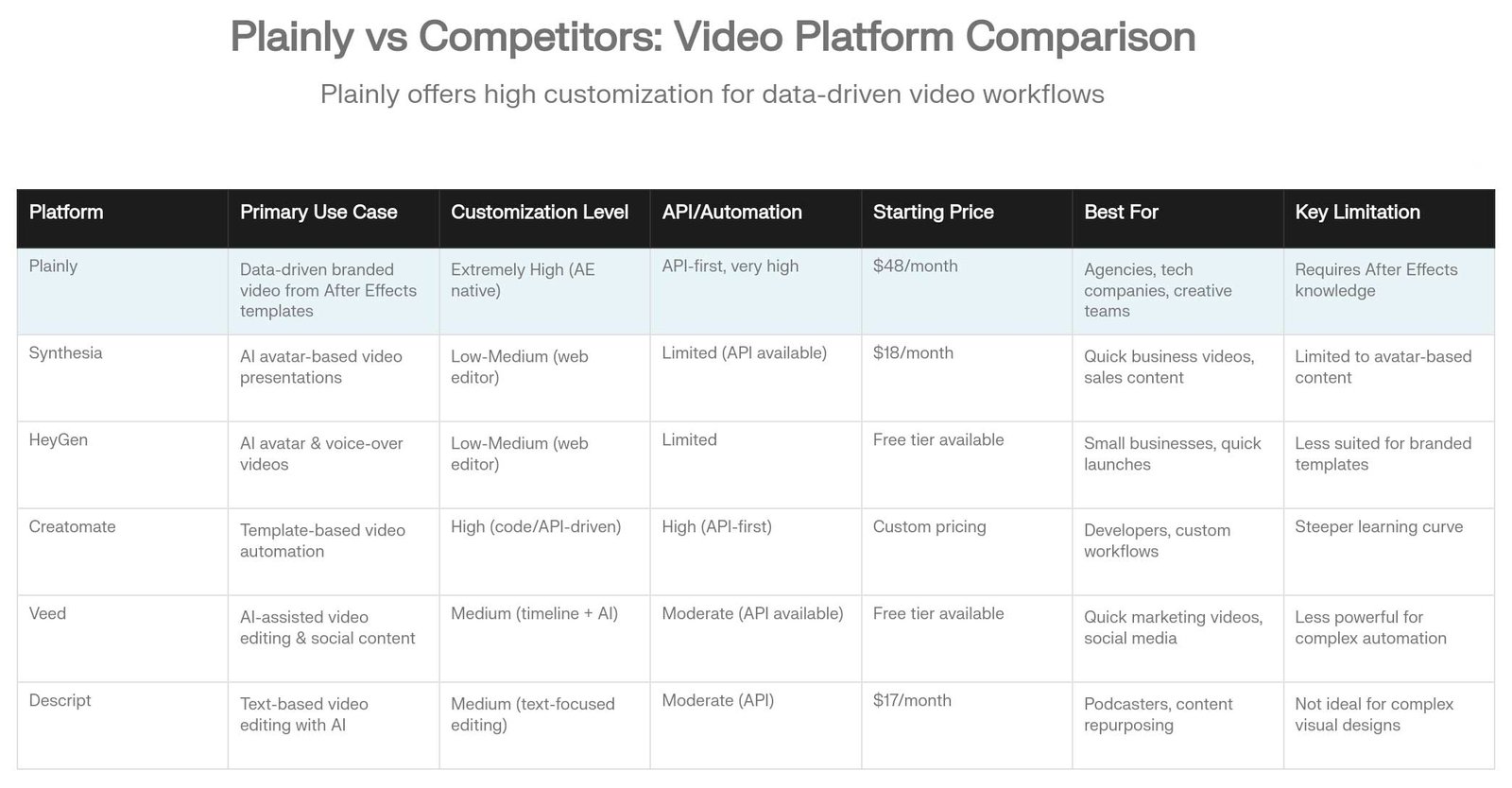
The video automation space has multiple players, but they serve different needs. Here’s how Plainly compares:
Plainly vs. Synthesia: Synthesia excels at AI avatar videos (talking heads). If your primary need is a realistic AI presenter delivering a script, Synthesia is cheaper ($18/month starting). But if you need branded, custom visual templates with complex animations, Plainly’s After Effects-native approach gives you infinitely more control. Synthesia is best for quick business videos; Plainly is best for polished, branded campaigns.
Plainly vs. HeyGen: Similar to Synthesia—HeyGen is avatar-focused. HeyGen’s edge is emotional expression in avatars. Plainly’s edge is template flexibility and API-first automation. If avatars are your use case, HeyGen wins. If pixel-perfect brand consistency matters, Plainly dominates.
Plainly vs. Creatomate: Creatomate is Plainly’s closest competitor—both are template-based, both support code-driven customization. Creatomate’s API is equally powerful, and pricing is similar (custom, typically $300+/month). The key difference: Creatomate’s templates are built in their web editor, while Plainly leverages After Effects. If you’re already investing in After Effects designers, Plainly integrates better. If you prefer a web-based editor, Creatomate is less intimidating.
Plainly vs. Veed: Veed is a browser-based video editor with AI assist features. It’s great for quick edits, subtitles, and social media clips. But Veed isn’t designed for data-driven automation or batch rendering. If you’re cutting down long videos into shorts, Veed is simpler. If you’re generating hundreds of variations from structured data, Plainly is your tool.
Plainly vs. Descript: Descript is text-based video editing. You edit video by editing transcripts. It’s powerful for podcasters and content repurposing, but not for data-driven template automation. Descript and Plainly serve different workflows.
Setup Guide: Getting Started with Plainly (Step-by-Step)
Phase 1: Prepare Your Template (Day 1-2)
- Open Adobe After Effects (Plainly requires AE 2020 or later)
- Create your video design as you normally would—text, graphics, animations, everything
- Identify which elements will be dynamic (text layers, image placeholders, colors)
- Download the Plainly plugin from plainlyvideos.com
- In After Effects, go to Window → Extensions → Plainly
- Log in with your Plainly account
- Click “Upload Project” — the plugin scans your project and auto-detects dynamic parameters
Phase 2: Set Up Your Data (Day 2)
- Decide your data source:
- Option A: Google Sheet (easiest for non-technical teams)
- Option B: CSV file (most flexible)
- Option C: API (most powerful for developers)
- Option D: Native integration (Zapier, Make, Airtable, etc.)
- Create your data file with columns matching your dynamic elements
- Example: Column 1 = Company Name, Column 2 = Contact Image URL, Column 3 = CTR Text
- Ensure URLs are accessible (images, videos must be publicly available)
- Test with 5-10 rows before scaling to thousands
Phase 3: Render Your First Batch (Day 3)
- In Plainly web app, go to “Render” section
- For batch rendering: Click “Batch Render”
- Upload your CSV or connect your Google Sheet
- Map columns to template parameters (intuitive interface guides you)
- Set output format (MP4, MOV, WebM, etc.)
- Add webhook (optional, for automatic upload to YouTube/Vimeo/S3)
- Click “Render” and let Plainly work its magic
Your videos will render in the background. Depending on video length and quantity:
- 100 × 1-minute videos: ~10-15 minutes
- 1,000 × 2-minute videos: ~1-2 hours
- Monitor progress in real-time dashboard
Phase 4: Automate (Advanced, Optional)
For continuous, hands-free automation:
Option A (Zapier/Make): Connect your CRM or email tool to Plainly via Zapier. Whenever a new lead arrives, Plainly automatically generates a personalized video and sends it to them.
Option B (API): Developers can call Plainly’s REST API directly from their applications. Every new order, event registration, or transaction triggers a personalized video.
Option C (Webhooks): Upload to Google Sheets, configure a webhook, and videos render automatically whenever you add a new row.
ROI and Productivity Metrics: What’s the Real Impact?
The numbers behind video automation are compelling. Let’s break down actual savings:
Time Savings
- Traditional video production: 150 hours per month for a marketing team (10 videos × 15 hours each)
- With Plainly automation: 20 hours per month (template creation + data prep)
- Monthly time savings: 130 hours = $6,500 in labor (at $50/hour specialist rate)
Cost Reduction
- Traditional video agency: $300-$500 per video
- Plainly production cost: $3-$15 per video (depending on plan)
- 80% cost reduction per video
Scalability
- Without automation: Creating 100 personalized videos = 1,500+ hours of work
- With Plainly: Creating 1,000 personalized videos = 10-20 hours of work
- 3,125% increase in content volume for same effort
Business Impact Metrics
- Video production time: 85% reduction possible
- Cost savings: 70% vs. traditional production
- Content output: 312% increase
- Engagement rates: 45% improvement on average
- Conversion rates: 67% increase in video-driven conversions
- Customer acquisition costs: 38% reduction
- Marketing ROI: 10-30% increase with personalization
- Payback period: 6-12 months (typical for automation platforms)
Real-World Case Study: Agency Transformation
One creative agency used Plainly to:
- Reduce processing time by 320%
- Cut operational costs by 70%
- Increase client capacity by 5x without hiring additional staff
- Deliver personalized videos on days instead of weeks
- Result: $500K+ additional annual revenue from new clients
Industry Trends Driving Plainly Adoption in 2026
1. Sports Streaming Acceleration
Sports is the fastest-growing OTT segment in 2026, with broadcasters moving to event-focused delivery models powered by cloud technology. Plainly enables instant creation of game recaps, lineup graphics, and highlight compilations—often required within minutes of live events.
2. Hyper-Personalization as Standard
93% of Gen Z viewers use a second screen while watching content. Brands increasingly expect to personalize video based on location, preferences, and behavior. Plainly’s data-driven approach makes this feasible at enterprise scale.
3. AI Dubbing and Localization
Plainly integrates with AI dubbing services to automatically localize videos for global audiences without expensive traditional dubbing. This opens new revenue streams for video producers.
4. Direct-to-Consumer Models
D2C brands need personalized content for each customer segment. Plainly enables ecommerce companies to automatically generate product videos, shipping updates, and personalized recommendations.
5. Cost Pressure in Content Creation
With economic headwinds, brands are cutting video budgets but maintaining output. Automation via Plainly solves this paradox—produce more with less.
Potential Limitations and Considerations
While Plainly is powerful, it’s not a universal solution. Consider these limitations:
Requires After Effects Expertise
You (or someone on your team) must know Adobe After Effects to create templates. This isn’t a point-and-click tool for non-designers. You might need to hire an After Effects freelancer ($50-$150/hour) to set up templates.
Not Ideal for Generative/AI-First Content
If your use case is “generate videos from text prompts using AI,” tools like Synthesia or Runway are better. Plainly is for structured, template-based automation, not AI generation from scratch.
Requires Structured Data
Your data must be clean, organized, and properly formatted (CSV, JSON, etc.). If you have messy data, expect data prep to take time.
Limited Free Trial
Plainly offers a 14-day free trial, which is reasonable but shorter than competitors like Synthesia (unlimited free tier with limitations). Plan ahead for evaluation.
Integration Learning Curve
While native integrations exist, setting up complex workflows (especially API-based ones) requires technical knowledge or consulting from Plainly’s team.
Advanced Workflows: Pushing Plainly’s Boundaries
Multi-Template Batch Rendering
Create 3 different video templates (e.g., horizontal TikTok, vertical Instagram, square YouTube) and batch render all 3 versions from a single data source. If you have 100 data rows and 3 templates, Plainly generates 300 videos automatically.
Conditional Logic with Layer Scripting
Using After Effects expressions, you can trigger different animation timing, text styling, or visual elements based on data values. Example: If purchase_amount > $1000, show premium tier messaging.
Real-Time Webhook Triggers
Configure webhooks so that whenever a new record arrives in your CRM, a webhook automatically fires a render request to Plainly. Videos are generated and distributed without human intervention.
White-Label Solutions
Agencies can embed Plainly’s API into their own platforms, offering video automation as a branded service to their clients. This creates new revenue streams ($50-$500/month per client).
Dynamic Asset Sourcing
Use Plainly with asset management platforms (Frame.io, Dropbox, S3) to automatically pull in the latest images, videos, or design variations. Your template references these dynamic assets and renders fresh content daily.
Frequently Asked Questions (FAQs)
Q: Do I need to know After Effects to use Plainly?
A: Technically no, but practically yes. The setup (template creation) requires After Effects knowledge. Once a template is created, non-technical team members can use the web app to render variations.
Q: Can I use Plainly with other video software (Premiere Pro, Final Cut Pro, DaVinci Resolve)?
A: No—Plainly is exclusively After Effects-native. This is by design, as AE’s native scripting capability enables more powerful automation.
Q: How long does it take to render videos?
A: Depends on video length and your plan’s concurrent render capacity. Typical: 1-minute videos render in 2-3 minutes each. Plainly renders multiple videos simultaneously, so 100 videos might finish in 30-60 minutes.
Q: Can Plainly work offline?
A: No—Plainly is cloud-only. You need internet to upload templates, manage data, and access rendered videos. (This is actually an advantage: no local rendering = faster turnaround.)
Q: What video formats does Plainly support?
A: Output formats include MP4, MOV, WebM, ProRes, DPX, and more. Export quality up to 4K on most plans.
Q: Does Plainly offer white-label options?
A: Yes. Enterprise clients can customize the UI, add their branding, and resell Plainly as their own video automation service.
Q: How does Plainly’s pricing compare to hiring a video team?
A: A junior video editor costs $40-$60K/year. Plainly Pro ($649/month = $7,788/year) handles what a 2-3 person team could do manually. ROI is typically achieved within 3-6 months.
Q: Is there a limit to how many videos I can create?
A: No limit on quantity—only on monthly video minutes (your plan’s quota). The $649 Pro plan includes unlimited minutes, so theoretically, you could render thousands of videos monthly.
Q: Can I integrate Plainly with my CRM?
A: Yes. Plainly integrates directly with Zapier and Make, which connect to virtually every CRM (HubSpot, Salesforce, Pipedrive, etc.).
Conclusion: Is Plainly Worth It?
Plainly is a specialized tool for a specific use case: creating many video variations from structured data and professional templates. It’s not for everyone, but for the right team, it’s transformative.
Plainly is worth it if you:
- Create videos regularly (weekly or more frequently)
- Need personalization or localization at scale
- Have After Effects designers on staff or budget for freelance template creation
- Want to reduce video production costs and time
- Serve global audiences needing localized content
- Need integration with your existing marketing stack
Plainly is probably not right if you:
- Create videos occasionally (a few times per year)
- Want AI avatar-based solutions (try Synthesia instead)
- Prefer no-code, drag-and-drop design (try Canva or Veed)
- Have messy, unstructured data
- Don’t have After Effects expertise available
Bottom Line: In 2026, where video content drives business growth and personalization is expected, Plainly eliminates the bottleneck between creative vision and production scale. At $48-$649/month, with typical payback in 6-12 months, it’s a strategic investment for teams serious about video marketing automation.
Start with Plainly’s 14-day free trial. Create one template, test with 10-20 data rows, and see the productivity gains firsthand. The platform’s learning curve is real, but the ROI is undeniable.












Leave a Reply
You must be logged in to post a comment.