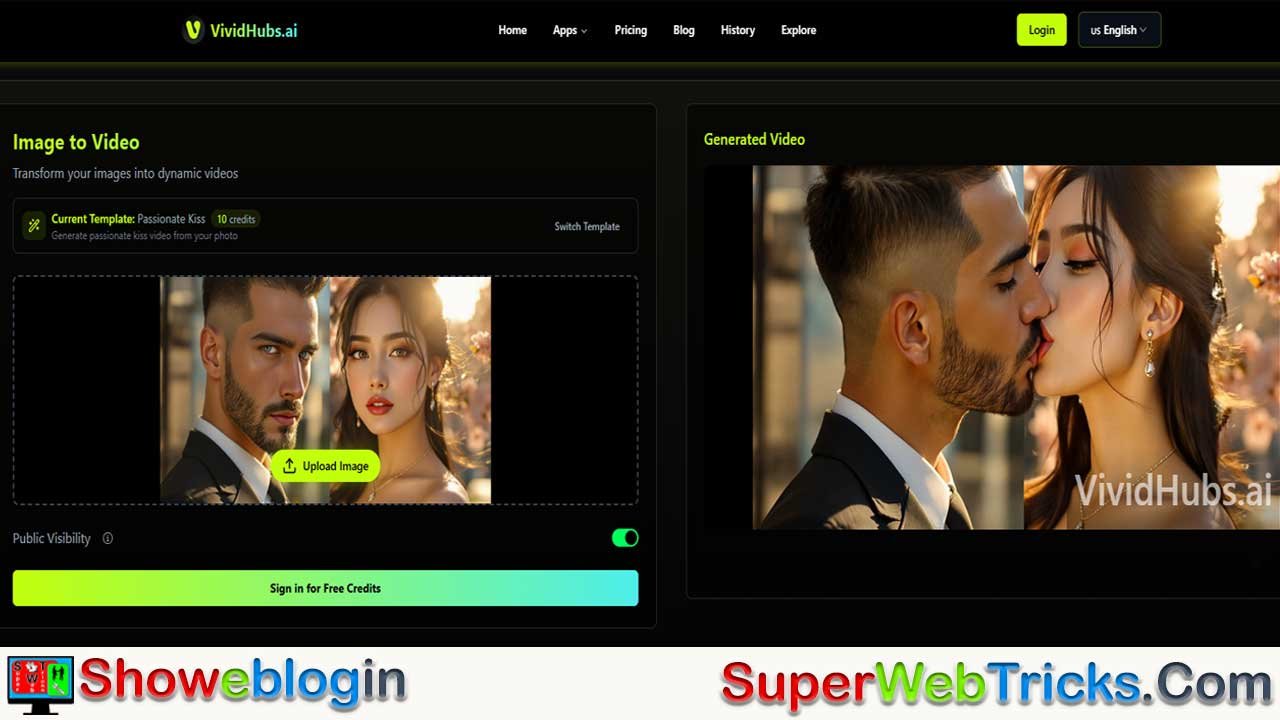






VividHubs AI is an easy-to-use tool that turns photos into realistic short videos, especially popular for AI kissing, hugging, dancing, and fun transformation effects.
Instead of using complicated text prompts, you just upload one or two photos and choose a template, and the AI animates natural facial movements and body motion.
It’s widely used for social media trends, emotional memories, and funny content, with paid plans offering faster processing, no watermarks, and commercial use. Overall, VividHubs makes it simple for anyone to create eye-catching and emotional AI videos in seconds.
| Info | Details |
|---|---|
| Tool Name | VividHubs AI |
| Website | https://vividhubs.ai |
| Core Function | Image-to-Video (AI animation) |
| Popular Features | AI Kiss, AI Hug, AI Dance, AI Muscle, AI Superhero |
| Best For | Social media creators, marketers, viral & emotional videos |
| How It Works | Animates photos using facial mapping & motion templates |
| Ease of Use | Very easy (upload photo + choose template) |
| Pricing Model | Credit-based monthly plans |
| Free Trial | Limited free/guest credits |
| Watermark-Free | Yes (paid plans) |
| Commercial Use | Yes (paid plans, per TOS) |
| Output Type | Short, realistic AI videos |
| Ideal Platforms | TikTok, Instagram Reels, YouTube Shorts |
VividHubs AI Review 2026: The Ultimate Guide to AI Kissing & Hug Video Generators
In the fast-evolving world of generative AI, the ability to breathe life into static images is no longer science fiction—it is a viral sensation. Whether it’s the heartwarming trend of “AI Hugs” that reunite families with lost loved ones, or the hilarious “AI Kiss” challenges dominating TikTok and Instagram Reels, one tool is currently leading the pack: VividHubs AI.
While many tools promise realistic video generation, VividHubs AI (vividhubs.ai) has carved a niche by focusing on human connection and hyper-realistic motion templates.
In this definitive Showeblogin review, we explore everything you need to know about VividHubs: from its cutting-edge technology and viral potential to a detailed breakdown of its pricing and best practices for perfect results.
What is VividHubs AI? (Beyond the Hype)
At its core, VividHubs AI is a cloud-based Image-to-Video (I2V) platform. Unlike traditional video editors that require manual keyframing, VividHubs utilizes advanced Generative Adversarial Networks (GANs) and motion synthesis algorithms.
How It Works
When you upload a photo, the AI doesn’t just “move pixels.” It creates a 3D mesh of the subject’s face and body. It identifies “facial landmarks” (eyes, nose, mouth corners) and maps them onto pre-learned motion data (a kiss, a hug, a dance move). This allows the AI to predict how a static face would look if it turned, puckered, or smiled, filling in the missing visual data with surprising accuracy.
Why It’s Different
Most AI video generators (like Sora or Runway) are text-to-video focused. VividHubs specializes in Template-Driven Image Animation. This means you get consistent, predictable results—perfect for users who want a specific outcome (like a hug) without struggling with complex text prompts.
3 Viral Features That Are Exploding on Social Media
If you are a content creator or digital marketer, these are the three features driving millions of views on social platforms.
1. The “AI Kiss” Generator (Couples & Crushes)
This is the platform’s flagship feature. It allows you to take two separate photos—or one photo of two people—and animate a realistic kiss.
- Viral Trend Idea: The “Long Distance Love” trend. Creators upload a photo of themselves and a partner they haven’t seen in months, captioning it: “Even though we are 5,000 miles apart, AI let me kiss you today.”
- Celebrity Mashups: Users are creating humorous videos of unlikely celebrity couples, driving massive engagement through comedy.
2. The “AI Hug” (Nostalgia & Tribute)
Perhaps the most emotional use case, the AI Hug feature creates a gentle, comforting embrace between subjects.
- Viral Trend Idea: “Hugging My Past Self.” Upload a photo of your current self and a childhood photo to create a video where you hug your “inner child.”
- Memorial Tributes: Bringing old family albums to life by animating a hug between a user and a late grandparent. Note: This content often has high shareability due to its emotional resonance.
3. Entertainment Templates (Muscle, Dance, Hero)
VividHubs isn’t just about romance. It offers high-energy templates for entertainment:
- AI Muscle: Instantly transform a regular photo into a bodybuilder flexing. Great for fitness humor.
- AI Dance: Make a serious corporate headshot perform trending TikTok dances.
- AI Superhero: Visualise yourself or friends as Iron Man or Superman.
Step-by-Step Guide: How to Get the Perfect Result
Not all AI generations are created equal. To avoid “glitchy” faces or warping, follow these pro tips when using VividHubs.
Step 1: Photo Selection is Critical
- Lighting: Use photos with even lighting. Deep shadows on faces can confuse the AI’s geometry mapping.
- Angles: Front-facing or slightly 3/4 angles work best. Profiles (side views) are harder for the AI to animate effectively.
- Clarity: High-resolution images yield high-resolution videos. Blurry inputs lead to blurry outputs.
Step 2: Choosing the Right Template
- Navigate to the dashboard and select your desired vibe.
- Romantic? Choose “Passionate Kiss” or “French Kiss.”
- Funny? Choose “AI Slap” or “Funny Dance.”
Step 3: The Upload Process
- Single Image Mode: Best for solo transformations (e.g., turning yourself into a superhero).
- Two Image Mode: Upload “Person A” and “Person B” separately. The AI will composite them together. This is ideal if you don’t have a group photo.
Step 4: Generate & Refine
- Hit “Generate.” Processing typically takes 30-60 seconds.
- Review: If the movement looks unnatural, try a different photo where the subject’s mouth is closed or their expression is neutral.
Detailed Pricing & Credit System
VividHubs operates on a “Credit” economy. Every video you generate costs a certain number of credits.
| Plan | Monthly Cost | Credits/Month | Effective Cost Per Video* |
|---|---|---|---|
| Basic | ~$11.90 | 150 Credits | Low |
| Plus (Popular) | ~$27.90 | 600 Credits | Medium (Best Value) |
| Pro | ~$55.90 | 2500 Credits | Lowest (Bulk Creation) |
Key Subscription Benefits:
- Watermark Removal: Paid plans allow you to download videos without the VividHubs branding—essential for professional content creators.
- Faster Processing: “Plus” and “Pro” users get priority in the server queue, meaning faster generation times during peak hours.
- Commercial Rights: Paid plans generally imply a license for commercial use (check TOS), allowing you to monetize these videos on YouTube or use them in ads.
Troubleshooting Common Issues
“Why does the face look distorted?”
This usually happens if the input photo has the face partially covered (by hair, hands, or glasses). Try a photo with a clear, unobstructed view of the face.
“The background is warping.”
AI motion synthesis focuses on the subject. Complex backgrounds (like intricate wallpaper or crowds) may shift or blur. Use photos with simple or blurred backgrounds (bokeh) for the cleanest look.
Final Verdict: Is VividHubs the Best in 2026?
VividHubs AI has successfully simplified high-end animation technology for the masses. It eliminates the steep learning curve of professional animation software, making it possible for anyone with a smartphone to create emotional, funny, or viral video content in seconds.
Pros:
- Zero Skill Curve: If you can upload a photo, you can use this tool.
- High Viral Potential: Specifically designed for social media trends.
- Emotional Impact: One of the best tools for “memory” videos.
Cons:
- Credit Consumption: Heavy experimentation can use up credits quickly.
The Bottom Line: If you want to ride the wave of AI video trends, or simply create a digital keepsake that feels like magic, VividHubs AI is a must-try tool.
👉 Start Creating Now: Visit VividHubs.ai
FAQs about VividHubs AI
What is VividHubs AI?
VividHubs AI is an image-to-video platform that turns photos into realistic animated videos like kisses, hugs, dances, and fun transformations using AI templates.
How does VividHubs AI work?
You upload one or two photos, choose a motion template, and the AI animates facial expressions and body movement automatically.
Is VividHubs AI easy to use for beginners?
Yes, it is designed for beginners and requires no editing or technical skills.
What are the most popular features of VividHubs AI?
AI Kiss, AI Hug, AI Dance, AI Muscle, and AI Superhero templates are the most popular.
Can I use two separate photos in one video?
Yes, VividHubs allows you to upload two different photos and combines them into one animated video.
Is VividHubs AI good for social media content?
Yes, it is optimized for viral content on TikTok, Instagram Reels, and YouTube Shorts.
Does VividHubs AI offer a free trial?
Yes, new users usually get limited free or guest credits to test the platform.
What is the pricing model of VividHubs AI?
It uses a credit-based monthly subscription system.
Do paid plans remove watermarks?
Yes, videos downloaded with paid plans are watermark-free.
Can I use VividHubs AI videos for commercial purposes?
Yes, paid plans generally allow commercial use, but users should check the terms of service.
How long does video generation take?
Most videos are generated within 30 to 60 seconds.
What kind of photos work best with VividHubs AI?
Clear, high-resolution, front-facing photos with good lighting work best.
Why does my generated video look distorted?
Distortion usually happens if the face is covered, blurry, or poorly lit in the original photo.
Does VividHubs AI work with old or low-quality photos?
It can work, but results are better with clear and sharp images.
Can I animate pets or animals using VividHubs AI?
Yes, many users successfully animate dogs and cats using hug or kiss templates.
Are backgrounds important in photo selection?
Yes, simple or blurred backgrounds give cleaner and more realistic results.
Is VividHubs AI better than text-to-video tools?
It is better for users who want specific actions like hugs or kisses without complex prompts.
Does VividHubs AI support mobile devices?
Yes, it works on mobile browsers as it is fully cloud-based.
Are my uploaded photos stored permanently?
VividHubs states that images are processed for generation and not publicly stored unless shared.
Can I regenerate videos if I’m not satisfied?
Yes, you can try again using a different photo or template, but it will consume credits.
Is VividHubs AI suitable for emotional or memorial videos?
Yes, many users use it for nostalgic and tribute-style videos.
Does VividHubs AI update its templates regularly?
Yes, new templates and features are added over time.
Is there a learning curve to using VividHubs AI?
No, the platform is designed to be simple and intuitive.
What makes VividHubs AI unique compared to competitors?
Its focus on human connection, emotional realism, and template-driven animation sets it apart.
Can businesses use VividHubs AI for ads?
Yes, marketers use it for scroll-stopping ads and promotional content.
Is VividHubs AI worth trying in 2026?
Yes, it is one of the easiest and most viral AI video tools available for creators and marketers.
Disclaimer: AI technology evolves rapidly. Pricing and features mentioned in this article are accurate as of early 2026 but subject to change by the developer.












Leave a Reply
You must be logged in to post a comment.