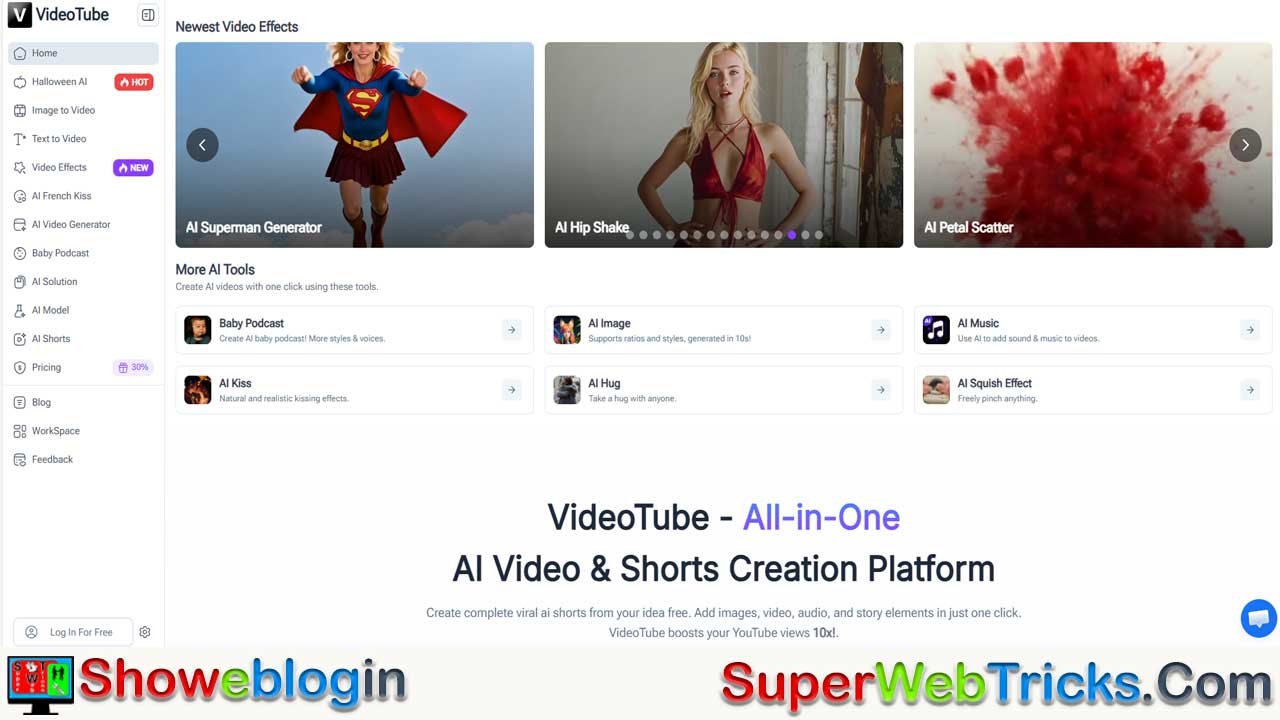






VideoTube is positioned as a powerful all-in-one, browser-based AI video creation platform designed to help creators, marketers, and businesses produce high-quality long-form videos and viral Shorts at scale without traditional editing headaches.
By unifying scriptwriting, image and video generation, animation, voiceovers, captions, music, and editing into a single dashboard, it replaces the need for multiple tools while emphasizing speed, automation, and trend-driven content. Its standout features include AI Shorts and faceless video generators, viral effects like AI Hug/Kiss/Squish, fast image-to-video animation, talking photos and avatars, and niche tools like Baby Podcast, making it especially attractive for Shorts creators, e-commerce sellers, educators, and digital marketers.
With a flexible credit-based pricing model, multi-language support, and commercial usage rights, VideoTube focuses less on cinematic experimentation and more on practical, monetizable workflows—making it a compelling solution for anyone serious about scaling content creation in the AI-driven creator economy.
| Feature | Details |
|---|---|
| Tool Name | VideoTube |
| Type | All-in-One AI Video & Shorts Creation Platform |
| Use Case | Automates video production, script writing, voiceovers, editing |
| Core Strength | Viral Shorts & Faceless AI Videos |
| Key Features | AI scripts, visuals, voiceovers, image-to-video, avatars, viral effects |
| Target Users | YouTube creators, TikTok/Instagram influencers, marketers, educators, e-commerce |
| Pricing Model | Credit-based (Free tier + paid plans) |
| Best For | Fast, automated video creation and scalable content workflows |
| Output Formats | MP4 videos for platforms like YouTube, TikTok |
| Monetization | Commercial rights included (check terms) |
| Language Support | Multiple languages |
| Platform | Browser-based |
| Value Proposition | Replaces multiple tools with one unified dashboard |
VideoTube Review 2026: The Ultimate All-in-One AI Video & Shorts Creation Platform
Stop editing for hours. Start automating your growth. Here is the deep dive into the tool changing the creator economy.
In the fast-paced world of digital content, speed is the new currency. Whether you are a YouTube automation expert, a TikTok influencer, or a digital marketer, the pressure to produce high-quality, engaging video content daily is overwhelming.
Enter VideoTube, a platform that promises not just to assist, but to revolutionize your workflow. It positions itself as the “All-in-One” solution, combining Generative AI, Video Editing, and Viral Trend Creation into a single browser-based dashboard.
But does it live up to the hype? In this comprehensive review, we explore every feature, uncover hidden tools for making money online, and analyze if VideoTube is the secret weapon your content strategy needs.
Why VideoTube is Disrupting the Market
Most AI tools do one thing well: they either generate images, clone voices, or edit clips. VideoTube disrupts this by unifying the entire stack.
The “All-in-One” Advantage
Instead of paying for Midjourney (images), ElevenLabs (voice), and Premiere Pro (editing), VideoTube allows you to:
- Generate Scripts: AI writes the story.
- Create Visuals: AI generates images or video clips.
- Animate: AI turns static images into motion.
- Voice: AI creates realistic voiceovers.
- Edit: AI compiles it all with captions and music.
Deep Dive: Key Features & Viral Tools
VideoTube isn’t just about standard video; it’s about viral video. Let’s break down the standout features.
1. AI Shorts & Faceless Video Generator
This is the core revenue driver for many users. The “Cash Cow Channel” model relies on posting 1-3 Shorts daily.
- How it works: You provide a topic (e.g., “History of Coffee”). VideoTube writes the script, selects relevant stock or AI-generated footage, adds a voiceover, and burns in dynamic captions.
- Why it wins: It automates the most tedious parts of editing—sourcing B-roll and syncing subtitles.
- Best for: YouTube Shorts, TikTok, Instagram Reels.
2. The Viral Effects Suite (Hug, Kiss, Squish)
Social media trends move fast. VideoTube offers specialized models that capitalize on specific viral movements:
- AI Hug Generator: This emotional tool allows you to upload two separate photos—perhaps a photo of yourself and a celebrity, or a lost loved one—and the AI creates a realistic video of the two hugging. This has been a massive trend on TikTok (Millions of views).
- AI Kiss & French Kiss: Adds romantic or comedic interaction effects to static images.
- AI Squish: A fun, interactive effect that makes characters or objects appear “squishy” and pliable.
3. Image-to-Video (The “Nano Banana” Engine)
Static images kill retention. The Image-to-Video tool breathes life into photos.
- Use Case: An e-commerce seller has a photo of a dress. Using VideoTube, they can make the fabric ripple or the model turn her head.
- Performance: It creates movement in under 10 seconds, boasting multi-model support for different aesthetic styles (Anime, Realistic, 3D).
4. Talking Photo & AI Avatar
Perfect for creators who are camera-shy but want a personal connection.
- Function: Upload a portrait and an audio file (or type text). VideoTube creates a deep-fake style video where the portrait speaks with perfect lip-syncing.
- Business Application: Customer support videos, educational explainers, and personalized sales messages.
5. Baby Podcast
A unique, niche feature that allows users to generate podcast-style content with AI “baby” voices or themes. While whimsical, it taps into the massive “cute content” market on social media.
Who Is VideoTube For? (Target Audience)
Understanding who uses this tool helps you understand its versatility.
- Shorts Creators: For volume and consistency. The “Viral Templates” allow for one-click creation.
- E-commerce Sellers: To turn product catalogs into video ads without hiring a production crew.
- Animation Studios: For rapid storyboarding and animatics. The Text-to-Video feature helps visualize scenes before full production.
- Teachers & Educators: Transforming boring lesson plans into engaging visual stories.
- Digital Marketers: Creating ad variations (A/B testing) quickly to lower CPA (Cost Per Action).
Step-by-Step Guide: How to Create a Viral Short on VideoTube
Want to see how easy it is? Follow this workflow to create your first video.
- Sign Up: Go to VideoTube.ai and create a free account to get your starter credits.
- Select “AI Shorts”: From the dashboard, choose the AI Shorts tool.
- Input Idea: Type a prompt like “3 Mind-Blowing Facts about Black Holes.”
- Customize: Choose your video style (e.g., Horror, Tech, Minimalist) and aspect ratio (9:16 for mobile).
- Generate: Click the button. The AI will generate the script, voice, and visuals.
- Edit (Optional): Use the editor to tweak captions or swap out a specific clip if it doesn’t fit.
- Export: Download the MP4 and upload it directly to YouTube or TikTok.
Pricing & Value Proposition
VideoTube uses a “Credit” system, which offers flexibility. You only pay for what you generate.
| Plan | Price (Approx.) | Credits | Best For |
|---|---|---|---|
| Free Tier | $0 | ~30 Credits | Testing features, creating 1-2 short clips. |
| Starter | $9.90/mo | ~300 Credits | Hobbyists, starting a new channel. |
| Pro | $29.90/mo | ~1100 Credits | Serious Creators, Agencies, Business owners. |
Note: The platform frequently offers discounts (e.g., 20-30% off), so check the website for current deals.
FAQ: Common Questions About VideoTube
Q: Is VideoTube really free?
A: Yes, it offers a free trial with credits upon registration. However, for watermark-free downloads and high-volume creation, a subscription is recommended.
Q: Can I monetize videos made with VideoTube?
A: Absolutely. You own the commercial rights to the videos you generate (check the specific terms of the plan you choose). Many users run monetized YouTube channels using these tools.
Q: What languages are supported?
A: VideoTube supports multiple languages for both input prompts and voice generation, making it ideal for creating content for global audiences (Spanish, French, German, etc.).
Q: Is it better than Sora or Runway Gen-2?
A: While tools like Sora focus purely on high-end generation, VideoTube focuses on utility. It wraps generation into a usable workflow with editing, audio, and scripts, making it a better “complete package” for YouTubers.
Final Verdict: The Future of Content is Automated
The gap between “having an idea” and “posting a video” has never been smaller. VideoTube is leading the charge by democratizing high-end video production.
If you are serious about scaling your online presence, you cannot afford to ignore AI video tools. VideoTube offers the perfect balance of power, ease of use, and affordability.
Don’t get left behind.
🚀 Start Creating with VideoTube for Free Today
Disclaimer: This article contains information about AI tools. Pricing and features are subject to change by the service provider.











Leave a Reply
You must be logged in to post a comment.