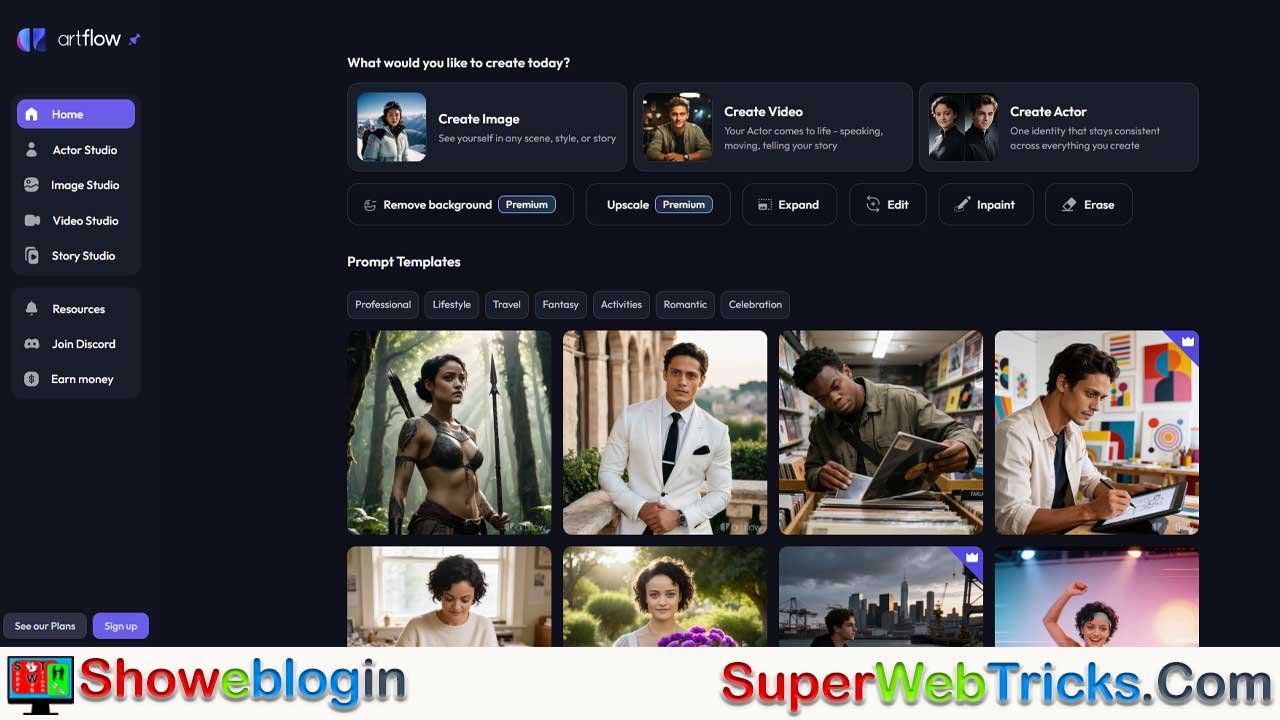






Artflow.ai is emerging as one of the most accessible and affordable AI creative studios in 2026, enabling content creators, marketers, and educators to generate professional-quality videos, images, and animated stories without expensive software or advanced technical skills.
Unlike traditional video production tools that require months of learning, Artflow.ai combines artificial intelligence with an intuitive interface to democratize creative content production. This comprehensive guide explores how the platform works, its pricing structure, real-world applications, and how you can leverage it for monetization—whether through YouTube AdSense, social media marketing, or direct client work.
What is Artflow.ai? Understanding the Platform
Artflow.ai is an AI-powered creative platform that serves as an all-in-one digital studio. Rather than juggling multiple tools for image generation, video creation, and character design, creators can accomplish everything within a single ecosystem. Launched to simplify content creation for the masses, Artflow.ai has gained traction with over 50 million creators globally who use the platform for everything from YouTube shorts to professional marketing campaigns.
At its core, Artflow.ai leverages machine learning algorithms to understand user inputs—whether text descriptions, uploaded images, or script outlines—and transforms them into visually compelling output. What sets Artflow apart in a crowded market of AI video generators is its focus on consistency and narrative-driven content. Rather than simply generating random AI videos, Artflow emphasizes character creation and storytelling, making it particularly valuable for creators who want to build recognizable personas and maintain visual continuity across projects.
The platform’s architecture supports multiple creative workflows: beginners can start with simple text-to-image generation using the Image Studio, intermediate users can leverage the Video Studio for quick social media clips, and advanced creators can utilize Story Studio—Artflow’s most powerful feature—to craft full animated narratives with multiple characters, lip-synced dialogue, and custom voiceovers.
Why Content Creators Are Switching to Artflow
Traditional video creation involves hiring actors, booking studio space, managing post-production, and dealing with copyright issues. This process can cost thousands of dollars per video. Artflow eliminates these friction points. A YouTube creator can now:
- Generate 30+ video variations in a single day using different AI actors
- Create personalized content at scale without hiring talent
- Avoid expensive licensing fees by using platform-generated visuals
- Maintain consistent character design across entire content libraries
- Experiment with multiple creative directions without financial risk
For international creators working with limited budgets, this represents a massive shift in production economics.
Core Features Explained: The Four Pillars of Artflow
1. Actor Builder: Creating Your Digital Clone
Actor Builder is Artflow’s headline feature and the primary reason many creators choose the platform over competitors. This tool transforms a collection of personal photos into a trainable AI character that can be placed in unlimited scenarios, outfits, and expressions.
How Actor Builder Works
The process is remarkably simple:
- Photo Upload: Users submit 10 to 15 high-quality, clear photographs of a subject (themselves, a client, or a model). Variety matters—different angles, lighting conditions, and expressions help the AI understand facial features from multiple perspectives.
- AI Training: Once uploaded, Artflow’s machine learning model analyzes the photos and creates a digital representation (actor) in approximately 10 to 15 minutes. This process happens on Artflow’s servers; users don’t need powerful hardware.
- Unlimited Generation: After training completes, users can generate unlimited images and videos featuring their trained actor in any scenario—astronaut in space, executive in a boardroom, character in a fantasy realm—without additional training costs.
Pricing Structure for Actor Training
One of Artflow’s most compelling offers is the first actor training is completely free. This removes the barrier to entry for trying the platform. However, users should understand the pricing for additional actors:
- First Actor: Free (included with any plan)
- Additional Actors: $8.99 per actor (one-time fee)
This per-actor model is transparent and budget-friendly. A creator building a diverse cast of characters for a YouTube series might train 5 unique actors and pay just $36 total ($8.99 × 4 additional actors after the free one). Compare this to traditional casting, where even non-union talent commands hundreds of dollars per day.
What About Deletion and Re-training?
Users often ask whether deleting an actor and training a new one avoids the $8.99 cost. The answer is straightforward: each actor trained counts as a separate purchase. If you delete an actor and want to create a new character, you’ll pay the training fee again. This encourages thoughtful character development rather than careless experimentation, though it’s not prohibitively expensive given the cost.
Image and Video Output from Trained Actors
Once trained, an actor becomes a perpetual asset. The FAQ clarifies that users can generate unlimited images and videos from their trained actor. This means:
- A trainer can create 100+ workout tutorial videos with their AI self
- A salesperson can generate personalized video messages for 1,000 prospects
- An educator can produce dozens of lesson variations without re-recording
- An influencer can churn out daily short-form content faster than traditional recording
There’s no limit to output quantity—you only pay for the training once.
Data Privacy: What Happens to Uploaded Photos?
A legitimate concern for users is data security. Artflow’s privacy documentation indicates that uploaded images are retained by the platform to support actor training and improvement. For creators with data privacy concerns, this means:
- Images are not deleted immediately after training
- The platform may use data to improve model quality (a standard practice)
- Users should ensure they have rights to all uploaded photos
- Sensitive personal information should not be uploaded to any AI platform
For most creators, this is acceptable. If privacy is paramount, consider training actors using professional headshots or photo shoots specifically intended for AI training rather than personal photos.
Social Media Rights: Can You Monetize Actor-Generated Content?
This is the critical question for any creator hoping to monetize content on platforms like YouTube, TikTok, or Instagram.
The answer depends on your Artflow plan:
- Free Plan: Limited to non-commercial use. YouTube and AdSense monetization are not permitted.
- Starter Plan ($8-20/month): Commercial use allowed, but with attribution (CC BY 4.0 license). You must credit Artflow in video descriptions.
- Pro Plan ($25-75/month): Full commercial license granted. This is a worldwide, non-exclusive, royalty-free copyright license with no attribution requirements. You own the content and can monetize freely.
For serious content creators, the Pro Plan ($25-40/month annually) is essential. The commercial license essentially pays for itself within days of YouTube AdSense earnings (a single viral video can generate far more revenue than the monthly subscription).
Training Another Person’s Actor (Ethical & Legal Considerations)
Artflow’s official guidelines allow training actors using photos of others—clients, colleagues, models—with one critical caveat: you must have written permission from the person in the photos. Using someone’s likeness without consent is not only ethically problematic but also exposes you to legal liability.
For legitimate use cases—a personal brand hiring a model, a company creating avatar versions of its team—this is straightforward. The model or employee agrees, you train the actor, and you can then generate unlimited content.
However, unauthorized use of someone else’s likeness (a celebrity, influencer, or random person) violates platform terms and potentially breaches privacy and publicity laws in most jurisdictions.
2. Image Studio: From Text to Stunning Visuals
While Actor Builder is Artflow’s flagship feature, the Image Studio is where everyday creators spend the most time. This module converts text descriptions into high-quality, customizable images.
Text-to-Image Capabilities
Users describe what they want—”a minimalist desk setup with a laptop, coffee cup, and plants in soft natural lighting”—and Artflow generates multiple variations matching that description. The platform supports:
- Detailed prompts for specific visual styles
- Style transfer (cinematic, illustration, 3D render, photography)
- Aspect ratio flexibility (square for Instagram, vertical for Stories, horizontal for YouTube thumbnails)
- Multiple generations allowing users to cherry-pick the best result
The v1 vs. v2 Image Generation Question
Artflow offers two image generation models, and understanding the difference helps optimize your credit usage:
- v1 Image Generation: Available unlimited on all plans (Free through Pro). This is the more accessible model—faster, lower credit cost.
- v2 Image Generation: Advanced model with improved quality and detail. Costs 1 credit per image on the Free plan; unlimited on Starter and Pro plans.
For most creators, unlimited v1 images are sufficient. v2 is valuable for high-stakes content requiring premium visual quality (professional client work, portfolio pieces).
The Allium Model Breakthrough (October 2025)
In October 2025, Artflow released Allium, described as the most powerful image model available on the platform. Subscribers received an extended set of Allium images with each new actor training at no additional cost. This represents continuous innovation—Artflow regularly updates its models, giving users access to cutting-edge AI capabilities without re-subscribing.
Advanced Image Editing Tools
Beyond basic generation, Image Studio includes post-generation editing:
- Upscale: Enhance image resolution without quality loss
- Edit Region: Modify specific parts of an image (e.g., change a character’s outfit or background)
- Remove Background: Isolate subjects for compositing into other designs
- Remove Watermark: On paid plans, export truly watermark-free images
These tools accelerate content creation workflows. An image that’s 80% correct can be refined to 100% rather than regenerated from scratch.
3. Video Studio: Cinematic Stories in Minutes
The Video Studio transforms text descriptions and actor performances into polished video clips suitable for social media, marketing, or personal projects.
Video Creation Workflow
- Select Character: Choose a trained actor or AI-generated character
- Write Dialogue: Input the script or dialogue the character should deliver
- Choose Voice: Select from a library of AI-generated voices (supporting multiple languages and accents)
- Select Scene: Pick a background or environment from the library
- Generate: Let Artflow render the video (typically takes 1-3 minutes)
The output is a short video—typically 15 to 60 seconds depending on dialogue length—with automatic lip-syncing matching the voice-over.
Presenter Mode for Explainers and Tutorials
A specialized feature called Presenter Mode is particularly valuable for educational content creators. Rather than filming yourself, you can:
- Script an entire course or tutorial series
- Have your AI actor present each lesson
- Add slides, graphics, or B-roll overlays
- Generate multiple takes with different voices or delivery styles
- Maintain perfect visual consistency across 100+ videos
For educators, online course creators, and corporate training departments, this cuts production time by 90%.
Director Mode: Creative Control for Perfectionists
For creators who want to fine-tune output beyond standard generation, Director Mode provides granular control:
- Pose Adjustment: Position your actor’s arms, head, and body
- Lighting Control: Change light direction, intensity, and color temperature
- Zoom and Framing: Adjust camera distance and composition
- Scene Elements: Add or remove props, adjust backgrounds
Director Mode requires more manual input than standard generation but produces highly polished results for professional clients.
Double Shot Feature: Multiple Characters in One Scene
Want your AI actor to interact with another character? The Double Shot feature allows multiple trained actors or AI-generated characters to appear in a single scene with synchronized lip-syncing and natural interaction. This enables:
- Dialogue-driven stories with multiple characters
- Interview-format content (interviewer + expert)
- Comedy sketches with character interactions
- Product demonstrations with multiple actors
Video Output Limitations by Plan
Not all plans offer equal video creation capacity:
| Feature | Free Plan | Starter Plan | Pro Plan |
|---|---|---|---|
| Story Studio Video | 2 min/month | 12 min/month | 40 min/month |
| Video Studio Video | 2 min/month | 6 min/month | 20 min/month |
| Remove Watermark | No | No (unless Starter+) | Yes |
| Commercial Use | No | Attribution required | Royalty-free |
For a full-time content creator producing daily videos, the Pro Plan ($25-75/month depending on credit tier) is necessary.
4. Story Studio: Narrative-Driven Animated Content
Story Studio is Artflow’s most ambitious feature—a complete animation tool for creating multi-scene, dialogue-driven narratives. Currently desktop-only, this module appeals to writers, comic creators, animators, and storytellers.
What is Story Studio?
Story Studio is essentially an animated storyboard builder. Instead of traditional storyboarding (static images), users:
- Write a full script or outline
- Assign trained actors and AI characters to scenes
- Set backgrounds, props, and visual elements
- Define character positions, expressions, and animations
- Add dialogue, voiceovers, music, and sound effects
- Render the complete story as an animated video
Real-World Applications
- Indie Animation: Aspiring animators can produce 5-10 minute short films without expensive animation software
- Educational Content: Teachers can create engaging lesson videos featuring characters, dialogue, and narrative arcs
- Comic Adaptation: Webcomic creators can animate their existing stories
- Marketing Stories: Brands can tell company origin stories, customer testimonials, or product narratives through animation
- Game Narratives: Indie game developers can create intro cinematics and in-game story sequences
Story Studio Output Limits
Video output from Story Studio is measured in total minutes per month:
- Free Plan: 4 minutes/month
- Starter Plan: 12 minutes/month
- Pro Plan: 40 minutes/month
For context, a 10-minute animated short requires 10 month’s worth of Free Plan allocation but only 1 month of Pro Plan allocation. This alone justifies upgrading for creators focused on Story Studio projects.
Pricing Breakdown: Finding Your Perfect Plan
Understanding Artflow’s pricing structure is essential because costs scale with your ambitions. Here’s a detailed breakdown:
Free Plan: $0/month
Ideal for: Experimenting, testing features, hobbyists with minimal output needs
What you get:
- 100 credits per month
- Unlimited v1 image generation
- 1 free actor training
- 4 minutes Story Studio video/month
- 2 minutes Video Studio video/month
- Watermarked outputs
- No commercial rights
Limitations:
- Watermarks on all images and videos
- No commercial use permitted (critical for monetization)
- Limited video generation capacity
- No priority support
Monthly Cost: Free (but limited)
Starter Plan: $8-20/month
Ideal for: Growing creators beginning to monetize, small business owners, educational content creators
Pricing Options:
- 300 credits/month: $8/month (annually) or $12/month (month-to-month)
- 600 credits/month: $15/month (annually) or $20/month (month-to-month)
- 900 credits/month: $20/month (annually) or $25/month (month-to-month)
What you get:
- Unlimited v1 and v2 image generation
- 1 free actor training
- 12 minutes Story Studio/month
- 6 minutes Video Studio/month
- Priority processing (faster generation)
- PNG image downloads
- Commercial use with attribution (CC BY 4.0 license)
- Video Studio voice preview
- Additional actor training at $8.99 per actor
Key Upgrade from Free:
- Commercial licensing (with attribution) unlocks YouTube monetization
- Significantly more video minutes per month
- Faster generation speeds
Monthly Cost: $96-240/year (or $8-20/month month-to-month)
Pro Plan: $25-75/month
Ideal for: Full-time content creators, agencies, brands, educators producing high volumes
Pricing Options:
- 1000 credits/month: $25/month (annually) or $40/month (month-to-month)
- 2000 credits/month: $50/month (annually) or $75/month (month-to-month)
- 3000 credits/month: $75/month (annually) or $100/month (month-to-month)
What you get:
- Everything in Starter Plan, plus:
- 40 minutes Story Studio/month
- 20 minutes Video Studio/month
- Full commercial license (royalty-free, worldwide)
- Unlimited video studio remix
- Create watermark-free videos
- Premium templates and advanced features
- Priority support
Key Upgrade from Starter:
- Full commercial license without attribution requirements
- Quadruple the video generation capacity
- Watermark-free output
- Highest credit allocation for unlimited experimentation
Monthly Cost: $300-900/year (or $25-100/month month-to-month)
Enterprise Plan: Custom Pricing
For: Large organizations, agencies, companies with custom requirements
Includes:
- All Pro Plan features
- Customized credit limits (beyond standard tiers)
- Dedicated account support
- Bulk actor training discounts
- Custom workflows and integrations
- SLA guarantees
Contact Artflow sales for pricing.
Credit System: What Are Credits?
Artflow uses a credit-based system where different actions consume different numbers of credits:
- Actor Training: Costs credits from your monthly allocation
- Image Generation (v2): Costs 1 credit per image
- Video Generation: Costs variable credits depending on length
- Story Studio Rendering: Costs credits based on output duration
The advantage is flexibility. If you have a quiet month, unused credits roll over partially (check Artflow’s current rollover policy). If you go viral and need to generate 100 video variations, you can purchase additional credits at rates like:
- 150 credits: $5
- 300 credits: $10
- 900 credits: $30
Which Plan Should You Choose?
| Creator Type | Recommended Plan | Monthly Cost |
|---|---|---|
| Hobby/Experimenting | Free | $0 |
| YouTube creator (1-5 videos/month) | Starter | $12-20 |
| YouTube creator (10+ videos/month) | Pro | $40-50 |
| Agency/Brand producing daily content | Pro (high tier) | $75-100 |
| Educational institution | Enterprise | Custom |
The Pro Plan typically pays for itself within days of YouTube monetization kicking in. A single video generating 10,000 views at typical CPM ($2-8) earns $20-80—covering the monthly subscription cost.
How to Get Started: Step-by-Step Guide
Creating Your First Actor
- Sign Up: Visit app.artflow.ai and create a free account (no credit card required for the free tier)
- Navigate to Actor Builder: On your dashboard, select “Actor Builder”
- Upload Photos: Provide 10-15 clear, well-lit photos showing different angles, expressions, and lighting
- Add Gender/Age: Select the gender and age category (Adult/Child) for the actor
- Start Training: Click “Get My Free Actor Now” to initiate the training process
- Wait 10-15 Minutes: The AI trains your actor while you wait
- Generate Content: Once training completes, begin generating images and videos featuring your new actor
Generating Your First Image
- Open Image Studio: Select “Create Image” from the dashboard
- Write Your Prompt: Describe the scene in detail (e.g., “Professional headshot of [actor] in a blazer against a neutral background, natural lighting”)
- Choose Aspect Ratio: Select the format (square for social media, horizontal for YouTube)
- Generate: Let Artflow create variations
- Refine: Use upscale, edit region, or remove background tools if needed
- Download: Export your image
Creating Your First Video
- Open Video Studio: Click “Create Video”
- Select Actor: Choose your trained actor
- Write Dialogue: Enter the script (e.g., “Hello, I’m here to teach you about AI video creation”)
- Choose Voice: Select from available AI voices and languages
- Select Scene: Choose a background from Artflow’s library
- Generate: Let Artflow render the video (takes 1-3 minutes)
- Download: Export as MP4 for upload to YouTube or social media
Scaling with Story Studio
- Switch to Desktop: Story Studio is desktop-only; use a computer, not mobile
- Start New Story: Click “Create Story” and select Story Studio
- Write Script: Input your full script or story outline
- Assign Characters: Drag actors into scenes
- Set Environments: Choose backgrounds and props
- Add Dialogue: Link script lines to characters
- Render: Generate the final animated video
Real-World Applications and Case Studies
YouTube Creator Scaling
Scenario: A productivity YouTuber produces 2-3 videos weekly but struggles with filming logistics, background setup, and scheduling.
Artflow Solution:
- Train an actor based on their own photos (free)
- Write 30 scripts for common productivity topics
- Generate videos in batches using Video Studio
- Customize each with different scenes, poses, and B-roll
- Maintain consistent visual branding across 120+ annual uploads
Result: Increase output from 2-3 to 10+ videos weekly without hiring or more complex production setup. With YouTube monetization at ~$3 CPM, 100 views weekly = $300+ monthly passive income, easily covering the Pro Plan subscription.
Educational Content at Scale
Scenario: An online course instructor teaches 5 different courses with 50+ lessons each. Currently, lessons are static slide presentations.
Artflow Solution:
- Create animated lesson intros with instructor character
- Generate visual explanations of complex concepts
- Produce character-driven tutorials
- Create multiple language versions using different voice options
Result: Courses become more engaging. Production time per lesson drops from 2 hours (filming + editing) to 20 minutes (scripting + AI generation). Higher completion rates lead to better reviews and more sales.
Personal Branding and Social Media
Scenario: A consultant wants to build authority on LinkedIn and Twitter but lacks video production skills.
Artflow Solution:
- Train actor based on professional headshots
- Generate weekly 30-second thought leadership videos
- Create industry-specific backgrounds and outfits
- Produce personalized video responses to client questions
Result: Consistent, professional video presence without expensive equipment or videography training. Engagement and follower growth accelerate.
E-commerce Product Videos
Scenario: An online store sells 500+ products but lacks product videos, which significantly boost conversion rates.
Artflow Solution:
- Create AI presenters demonstrating products
- Generate lifestyle shots featuring products in use
- Produce comparison videos between product variants
- Create multiple language versions for international markets
Result: Product videos increase conversion by 20-40% (industry standard). With Pro Plan at $50/month, ROI is achieved within days on even a small product store.
Monetization Strategies: Turning Artflow into Income
Strategy 1: YouTube AdSense (Direct Monetization)
How It Works: Upload Artflow-generated videos to YouTube, enable monetization, and earn revenue from ads shown in your videos.
Requirements:
- YouTube Partner Program membership (1,000 subscribers, 4,000 watch hours)
- Artflow Pro Plan (for commercial license)
- Original content (Artflow content qualifies)
Earnings Potential:
- Average CPM (cost per thousand impressions): $2-8 USD
- Typical RPM (revenue per thousand views): $1-4 USD
- Earning example: 100,000 monthly views × $2.50 RPM = $250 monthly
Advantages:
- Passive income once videos are uploaded
- Scales with audience growth
- Artflow automates production, reducing effort
Challenges:
- YouTube algorithm favors authenticity; pure AI content must offer value
- Requires audience building (can take 6-12 months to 1,000 subscribers)
- CPM varies by geography (lower in developing countries, higher in US/UK/Canada)
Strategy 2: Selling Courses and Digital Products
How It Works: Use Artflow to create engaging course content, sales videos, or digital products, then sell via platforms like Udemy, Teachable, or Gumroad.
Implementation:
- Script 5-10 course modules
- Generate videos using Story Studio (animated instruction)
- Create promotional videos using trained actors
- Host on course platform
- Drive traffic via email, social media, or ads
Earning Potential:
- Udemy course: $30-100 per student, 10-50 students monthly = $300-5,000/month
- Teachable course: $50-500 per student, control pricing and revenue share
- Digital product (templates, guides): $10-50 per sale, unlimited sales
Advantages:
- Higher profit margins than AdSense
- Builds personal authority
- Scalable without proportional time investment
- Can reach global audiences
Strategy 3: Freelancing and Client Work
How It Works: Offer Artflow-based services to clients—video production, animated explainers, social media content creation.
Services to Offer:
- YouTube video production (monthly retainer)
- LinkedIn personal branding videos
- Product demo videos for e-commerce brands
- Course video production for educators
- Social media content creation (TikTok, Instagram Reels)
Pricing Examples:
- Simple video production: $100-300 per video
- Monthly content packages: $1,000-5,000/month
- Custo training + content series: $500-2,000
Earning Potential:
- Part-time freelancer: $1,000-5,000/month
- Full-time freelancer: $5,000-15,000/month
- Agency owner (scaling with team): $20,000+/month
Advantages:
- Immediate income (not dependent on audience)
- Can charge premium rates (clients don’t know cost is low)
- Builds business relationships and referrals
- Services are in high demand
Strategy 4: Selling Presets and Templates
How It Works: Create Artflow templates, scripts, prompts, and character presets for other creators.
Products to Sell:
- Pre-written scripts (100 YouTube video scripts: $29-99)
- Prompt packs (1,000 image generation prompts: $19-49)
- Trained actor templates (character designs: $9-29 each)
- Story Studio templates (pre-built story structures: $19-99)
Platform Options:
- Gumroad (digital products)
- Etsy (creative templates)
- Your own website
- Teachable (as mini-courses)
Earning Potential:
- Low volume (10 sales/month): $200-500/month
- Medium volume (50 sales/month): $1,000-2,500/month
- High volume (200+ sales/month): $4,000+/month
Strategy 5: Affiliate Marketing
Artflow offers an affiliate program paying 25% commission for referred payments, plus 50 bonus credits for sign-ups through your link.
How to Promote:
- Write YouTube video reviews of Artflow
- Include honest testimonials in blog posts
- Share affiliate links in your content
- Create tutorial videos and recommend Artflow
- Build an email list and promote to subscribers
Earning Potential:
- Artflow Pro Plan is $40-75/month; you earn $10-18.75 per subscription
- Referring 20 customers/month = $200-375/month passive income
- Scales as your audience grows
Artflow vs. Competitors: How It Stacks Up
Artflow vs. Runway (Gen-4.5)
| Feature | Artflow | Runway |
|---|---|---|
| Pricing | $0-100/month | $15-40/month |
| AI Actor Training | Yes, $8.99/actor | Limited |
| Video Quality | Good (improving) | Excellent (professional grade) |
| Ease of Use | Very easy | Moderate (steeper learning curve) |
| Best For | Storytelling, social media | Advanced video editing, effects |
| Commercial Rights | Pro plan included | Requires commercial add-on |
Winner: Artflow for beginners and storytelling; Runway for professional-grade editing.
Artflow vs. HeyGen
| Feature | Artflow | HeyGen |
|---|---|---|
| Pricing | $0-100/month | $29+/month |
| AI Avatar Quality | Good | Excellent (more realistic) |
| Video Generation Speed | 1-3 minutes | 2-5 minutes |
| Language Support | Multiple | 100+ languages |
| Best For | Character-driven narratives | Business videos, multilingual content |
| Learning Curve | Minimal | Minimal |
Winner: Artflow for cost; HeyGen for realism and language support.
Artflow vs. Synthesia
| Feature | Artflow | Synthesia |
|---|---|---|
| Pricing | $0-100/month | $29+/month |
| Avatar Quality | Good | Professional (enterprise-grade) |
| Customization | High (full character control) | Moderate (limited customization) |
| Best For | Creative storytelling, personal brands | Corporate training, business videos |
| Learning Curve | Minimal | Minimal |
| Scalability | Good | Excellent (enterprise features) |
Winner: Artflow for creative freedom; Synthesia for corporate standardization.
Key Takeaway
Artflow occupies a unique position: lowest cost with the highest creative control for character-driven content. While Runway offers superior video quality and HeyGen/Synthesia excel in specific niches (realism, corporate training), Artflow’s combination of affordability, Story Studio narrative capabilities, and actor training makes it unbeatable for content creators and educators on a budget.
Common Questions Answered
Can I Use Someone Else’s Photos to Train an Actor?
Yes, but with critical legal conditions:
- You must have explicit written permission from the person
- Using unauthorized photos of celebrities or random people violates terms and potentially breaks laws (publicity rights, privacy laws)
- Legitimate uses: client photos (with permission), employee photos, model releases
What Happens If I Delete a Trained Actor?
The actor is removed from your account. If you want to train that actor again, you’ll pay the $8.99 fee again. Each actor is tracked independently, so deleting and re-training is treated as creating a new actor.
Will My Uploaded Photos Be Stored Permanently?
Artflow retains uploaded photos to support model training and improvement. If data privacy is a concern, train actors using professional stock photos or purpose-created shoots rather than personal photos.
Can I Use Artflow Content for Commercial YouTube Videos Monetized with AdSense?
Only on paid plans:
- Free Plan: No commercial use
- Starter Plan: Yes, with attribution (mention Artflow in video description)
- Pro Plan: Yes, full commercial license with no attribution required
Violating commercial terms risks YouTube demonetization and account strikes.
How Long Does Video Generation Take?
- Video Studio: 1-3 minutes typical
- Story Studio: 5-15 minutes depending on length and complexity
- Image Generation: 30-60 seconds typical
Generation speed depends on server load and content complexity.
Can I Create Faceless YouTube Videos with Artflow?
Yes. While Artflow’s actor training is a headline feature, you can:
- Generate images and use them as thumbnails or B-roll
- Create story-driven animations using Story Studio without visible actors
- Produce voiceover-only videos with text and visuals
However, Artflow is optimized for character-driven content, so faceless channels (gaming, lists, compilations) might be better served by other tools.
What Languages Does Artflow Support?
The platform supports multiple languages for voiceover and text generation, though the interface is primarily English. Voiceover options include various English accents plus other languages. Character-driven content transcends language barriers—an animated video with your AI actor works globally.
Is Artflow Better Than Making Videos Myself?
It depends on your constraints:
| Your Constraint | Is Artflow Better? | Why |
|---|---|---|
| Time-limited | Yes | 80% faster production |
| Budget-limited | Yes | $0-100/month vs. $5,000+ equipment |
| Shy on camera | Yes | Use AI actor instead |
| Want consistent uploads | Yes | Easier to scale |
| Want professional polish | Maybe | Good but not cinema-quality |
| Building personal brand | Maybe | Authenticity matters; mix AI + real |
The Best Approach: Hybrid content mixing Artflow-generated videos with real footage of yourself. This leverages Artflow’s efficiency while maintaining the authenticity audiences crave.
Conclusion: Is Artflow.ai Right for You?
Artflow.ai represents a paradigm shift in content creation. For under $50/month, you gain access to tools that would cost hundreds or thousands through traditional means. The platform democratizes video production, enabling aspiring creators, educators, and entrepreneurs to compete with established media companies.
You should use Artflow if you:
- Produce regular video content for YouTube, TikTok, or LinkedIn
- Create educational or training materials
- Need consistent character-driven content
- Work with limited budgets or in-house production capabilities
- Want to experiment with AI-generated visuals without expensive software
- Plan to monetize content through ads, courses, or client work
You might want to explore alternatives if you:
- Require Hollywood-level video production quality (Runway, HeyGen)
- Focus on faceless content (voiceover-only, music videos, animations)
- Need hyper-realistic avatars for corporate training (Synthesia)
- Prefer hand-drawn or specific artistic styles
For most content creators in 2026, Artflow occupies a sweet spot: accessible, affordable, and genuinely impressive. Start with the free plan, spend 30 minutes exploring, and you’ll quickly understand whether it fits your creative workflow.
The creators who leverage Artflow effectively aren’t replacing traditional skills—they’re augmenting them, compressing production timelines, and scaling content output. In a world where consistency and frequency drive algorithmic success, Artflow delivers both.
Your next 100 videos might be just a few clicks away.
Final Monetization Checklist
Before launching your Artflow-based content business, ensure you have:
✓ Free Artflow account (cost: $0, time: 5 minutes)
✓ First actor trained (cost: $0, time: 15 minutes)
✓ 5-10 test videos generated (cost: $0, time: 30 minutes)
✓ YouTube channel or platform selected for hosting
✓ Pro Plan subscription if monetizing ($25-75/month)
✓ Basic SEO understanding (keywords, thumbnails, descriptions)
✓ Content calendar (topics, posting schedule, promotion plan)
✓ Analytics tracking (measuring views, watch time, revenue)
✓ Legal review if using other people’s photos (written permission)
✓ Initial audience (even 100 loyal followers give you a head start)
With these in place, you’re positioned to generate meaningful revenue from Artflow-based content within 3-6 months.
Welcome to the future of content creation.












Leave a Reply
You must be logged in to post a comment.