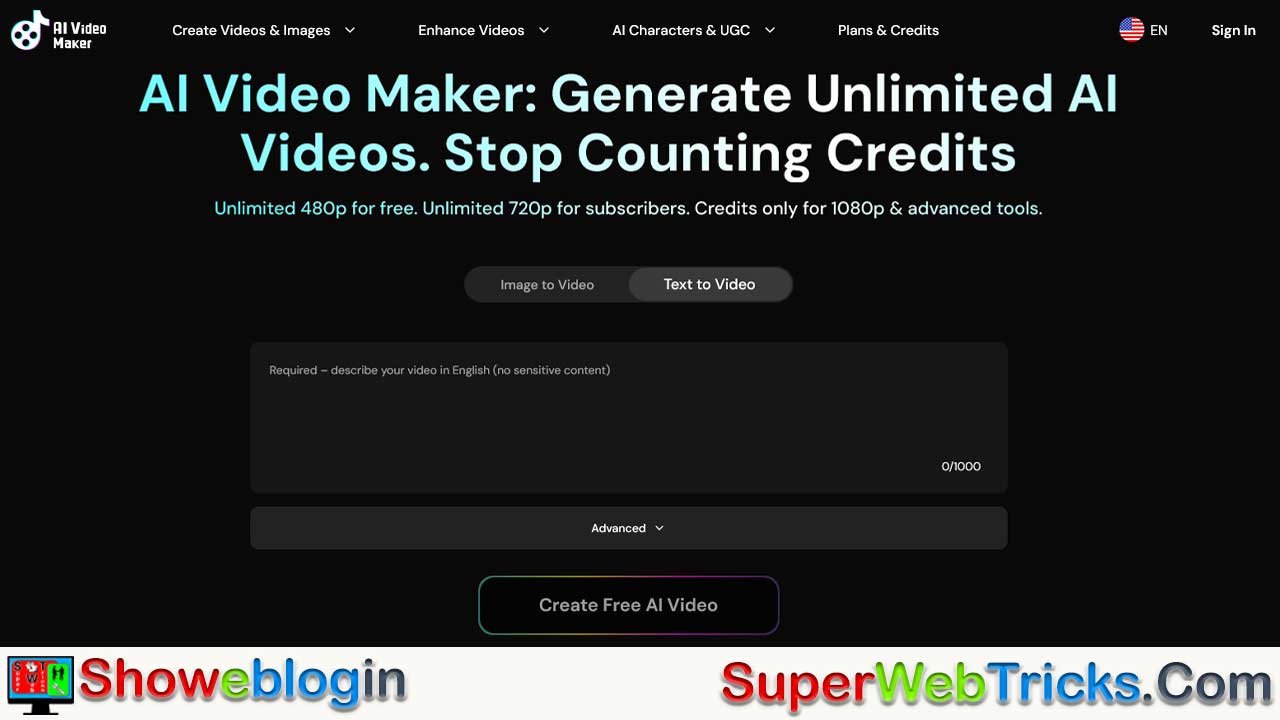






Today, we will understand through this article that 2026 is a pivotal year for content creators because AI video generation has removed the biggest barriers to entry—cost, complexity, and time—by offering tools like AI Video Maker that allow anyone to create professional, watermark-free videos for free or at low cost with no technical skills or sign-ups.
This Showeblogin article explains how the platform works, compares it favorably to competitors, outlines step-by-step creation workflows, and details advanced features such as image animation, singing photos, UGC ads, avatars, and upscaling. The piece emphasizes monetization paths including YouTube, AdSense, affiliates, sponsorships, and digital products, showing realistic income timelines and the importance of commercial rights for legal clarity.
Through case studies, SEO strategies, and scaling plans, it concludes that AI Video Maker democratizes video production, enabling creators, marketers, and businesses to rapidly test, publish, and profit from video content, making early adoption a major competitive advantage in the exploding creator economy.
| Category | Information |
|---|---|
| Industry Context | Video accounts for 80%+ of internet traffic; creator demand at all-time high |
| Main Problem | Traditional video tools cost $15–$50/month and limit output |
| Solution | AI Video Maker offers free, browser-based, unlimited draft video creation |
| Free Tier | 480p videos, 5 seconds max, unlimited drafts, no signup, watermark-free after draft |
| Paid Tier | 720p+ HD, no watermarks, commercial rights, faster jobs, advanced tools |
| Core Features | Text-to-video, image-to-video, AI image generator, editor, upscaler |
| Advanced Tools | Singing photos, UGC ads, product avatars, 1080p generation |
| Technology | Powered by Wan 2.2 AI model for smooth motion and reliable quality |
| Key Advantage | No sign-up required for drafts + unlimited free testing |
| Best Use Cases | Social media clips, YouTube, product demos, ads, education, storytelling |
| Competitor Edge | Easier, faster, cheaper than Runway, Kling, Veo, HeyGen for beginners |
| Monetization Channels | YouTube, AdSense, affiliates, sponsorships, digital products, merch |
| YouTube CPM (US) | ~$32.75 per 1,000 views (high revenue potential) |
| Short-Form Revenue | Low CPM; best used to drive traffic to YouTube |
| Commercial Rights | Included in paid tier; required for monetization and client work |
| Income Timeline | $300–$2,500/month in 7–12 months; $15k+/month possible at scale |
| Ideal Users | Creators, solopreneurs, SaaS teams, affiliates, e-commerce brands |
| Hardware Needed | None — fully cloud-based, works on any browser |
| Final Takeaway | AI video creation in 2026 is democratized, scalable, and highly monetizable |
The Video Creation Revolution: Why 2026 Is Your Moment to Dominate Content Creation
The video content industry is experiencing unprecedented growth. According to industry analysis, video now accounts for over 80% of all internet traffic, and the demand for video creators has never been higher. Yet here’s the brutal reality most aspiring content creators face: professional video creation tools cost anywhere from $15 to $50 monthly, and even then, they restrict how many videos you can generate. For beginners and solopreneurs bootstrapping their way to success, these paywalls feel like insurmountable barriers.
What if there were a completely free, unlimited AI video generation platform that requires no technical skills, no sign-up hassle, and no watermarks holding you back? Enter AI Video Maker—a game-changing tool that’s democratizing video creation for creators, marketers, and entrepreneurs worldwide.
In this comprehensive guide, we’ll explore how this powerful platform works, compare it against industry competitors, reveal monetization strategies that can turn your videos into genuine income streams, and show you exactly how to leverage AI Video Maker to build a profitable content business.
What Is AI Video Maker? Understanding the Platform
AI Video Maker is a free, browser-based AI video generation platform that transforms static images and text prompts into dynamic, professionally-quality video content. Unlike traditional video editing software that requires hours of learning and expensive equipment, AI Video Maker automates the entire creative process using advanced artificial intelligence models.
Key Specifications and Capabilities
The platform operates on a credit-based system designed specifically for accessibility:
Free Tier Specifications:
- Unlimited 480p video generation (5-second maximum duration)
- No account signup required to create drafts
- Text-to-video conversion from detailed prompts
- Image-to-video animation capabilities
- AI-powered image editing tools
- Watermark-free exports after draft completion
Premium Tier (Paid Plans):
- Unlimited 720p HD generation without watermarks
- Multiple concurrent job processing for faster workflows
- Commercial rights to all generated content
- Access to advanced features
Advanced Tools (Credit-Based):
- 1080p ultra-HD video generation
- Singing photo feature with real vocals and music
- Photo animation with natural lip-sync
- UGC (User Generated Content) style advertisement creation
- AI video upscaling technology
- Product avatar and presenter tools
Technology Foundation
The platform is powered by Wan 2.2, a cutting-edge AI model known for producing smooth motion, reliable rendering, and consistently creative results across diverse content types. This technical foundation ensures your videos maintain professional quality regardless of whether you’re creating 480p drafts or upgrading to full HD.
AI Video Maker vs. Competitors: An Honest Comparison
The AI video generation market is crowded with legitimate players, each offering distinct value propositions. Here’s how AI Video Maker stacks up against industry leaders:
| Feature | AI Video Maker | Runway ($15/mo) | Kling AI | Google Veo 3 | HeyGen |
|---|---|---|---|---|---|
| Free Tier | Yes, unlimited 480p | Limited | Yes, with watermarks | Limited free credits | Yes, basic features |
| 720p HD | Unlimited (paid) | Yes ($15/mo) | Premium only | Advanced features paid | Yes (paid) |
| No Sign-Up Required | Yes (drafts) | No | No | No | No |
| Text-to-Video | Yes | Yes (Gen-3 only) | Yes | Yes | Yes |
| Image-to-Video | Yes | Yes | Yes | Yes | Limited |
| Commercial Rights | Yes (paid tier) | Yes ($15/mo) | Yes (paid) | Yes (varies) | Yes (paid) |
| Generation Speed | Fast | Moderate-Fast | Moderate (30-65 sec) | Moderate (400+ sec) | Moderate |
| Ease of Use | Beginner-Friendly | Professional | Intermediate | Advanced | Beginner-Friendly |
| Best For | Rapid prototyping & testing | Professional creators | Long-form content | Premium quality | Corporate explainers |
Critical Advantage: The No Sign-Up Workflow
One often-overlooked feature of AI Video Maker is the ability to create and refine unlimited drafts completely free without ever providing an email address or payment information. This is revolutionary for content testing—you can rapidly iterate on ideas, experiment with different prompts and images, and validate content concepts before committing resources.
In contrast, Runway, Kling, and Google Veo 3 all require account creation and authenticate users before granting any generation access. HeyGen falls somewhere in the middle, offering limited free features but demanding registration.
Complete Feature Breakdown: What You Can Create
Text-to-Video Generation
Transform written descriptions into fully animated video scenes in minutes. The platform analyzes your text prompt and generates visuals with smooth motion, proper pacing, and contextually appropriate cinematography.
Optimal Use Cases:
- Social media clips for TikTok, Instagram Reels, and YouTube Shorts
- Educational explainer videos for blogs and websites
- Product demonstration videos for e-commerce stores
- Marketing and promotional content
- Narrative storytelling for content creators
Example Prompt Performance: A detailed prompt like “A whimsical village nestled at the base of a giant, hollow tree trunk, surrounded by lush greenery. Little gnomes drive miniature wooden trains. Sunlight filters through leaves, creating soft shadows” generates cinematic-quality 5-second clips perfect for social media platforms.
Image-to-Video Animation
Static photographs and images become dynamic, moving videos with professional transitions and motion effects. Upload JPG, PNG, or WEBP formats (up to 10MB, minimum 300px dimensions) and watch the AI bring them to life.
Practical Applications:
- Animating product photos for Amazon and Shopify
- Creating parallax effects for travel and lifestyle content
- Turning family photos into memorable video gifts
- Generating B-roll for YouTube videos
- Building portfolio showcases for agencies and freelancers
AI Image Generation for Storyboards
Before generating videos, create custom images directly within the platform using AI image generation. Build entire visual narratives from text descriptions, then convert these images into video clips.
AI Image Editor for Video Preparation
The built-in image editor allows you to restyle, remove, expand, and combine images using simple text prompts—all without leaving the platform. Prepare professional-grade frames for video generation in seconds.
Singing Photo Feature
Upload a photo, provide lyrics, select a genre, and the AI generates a realistic singing performance with natural vocals. This advanced tool creates engaging short-form content perfect for memes, holiday greetings, and viral hooks.
UGC Ads (User Generated Content Style)
Transform scripts and product visuals into authentic-looking user-generated content advertisements. Perfect for scaling Facebook and Instagram ad creatives without hiring expensive production teams or influencers.
AI Video Upscaler
Take any generated video and upgrade it to sharp, publication-ready HD finish. Particularly useful for scaling 480p drafts to 720p when you’re ready to publish.
AI Product Avatar
Place your product on camera with a realistic presenter giving a demonstration or product pitch. Ideal for e-commerce businesses and SaaS companies looking to scale video content without human talent.
Step-by-Step: How to Create Your First AI Video
For Beginners: Creating Your First Video in 3 Minutes
Step 1: Choose Your Input Method
Navigate to https://aivideomaker.ai/ and select your preferred creation method:
- Text-to-Video: Type or paste a detailed scene description
- Image-to-Video: Upload an existing photo (JPG, PNG, or WEBP up to 10MB)
Step 2: Craft Your Prompt (Text-to-Video)
Write vivid, descriptive text. Include:
- Setting and environment details
- Objects, people, and characters
- Lighting and atmospheric conditions
- Movement and action
- Desired mood and tone
Example: “A busy coffee shop with warm, golden afternoon light streaming through windows. Steam rises from espresso cups. People work on laptops, read books, and have animated conversations. Cozy and productive atmosphere.”
Step 3: Select Your Model and Settings
Choose from available AI models powered by Wan 2.2 and configure:
- Video duration (up to 5 seconds for free tier)
- Aspect ratio (16:9 for YouTube, 9:16 for mobile)
- Quality preference (480p free, 720p+ paid)
Step 4: Generate Your Draft
Click generate and wait 30 seconds to 2 minutes for processing. No sign-up required.
Step 5: Review and Iterate
Watch your generated video. Don’t love it? Create unlimited variations for free. Adjust your prompt, change the image, or try different settings—all without restrictions.
Step 6: Upgrade When Ready
Once satisfied with your draft, upgrade to:
- Remove watermarks for professional publishing
- Export in 720p or higher for premium quality
- Enable commercial rights for YouTube monetization and client projects
- Unlock advanced tools like upscaling and product avatars
Pro Tips for High-Quality Outputs
- Be Specific with Details: Vague prompts produce generic results. Include lighting conditions, camera angles, and specific objects.
- Use Visual References: When uploading images for animation, higher-quality source images produce better videos.
- Leverage the AI Image Generator First: Create custom images, then animate them for maximum control over your final product.
- Test Multiple Variations: Generate 5-10 different versions of the same concept. Select the best output for publishing.
- Combine Multiple Tools: Generate an image, edit it for perfection, animate it to video, then upscale for HD—all within one platform.
Monetization Strategies: Turning Videos Into Income
The critical question for any content creator is simple: How do I make money from these videos? Here’s where AI Video Maker’s commercial rights feature becomes genuinely valuable.
Strategy 1: YouTube Monetization (Highest Potential Revenue)
YouTube remains the most accessible video monetization platform, generating $2 to $30 per 1,000 views depending on viewer geography and content quality.
Current YouTube CPM Rates by Region (2026):
- Australia: $36.21 per 1,000 views
- United States: $32.75 per 1,000 views
- Canada: $29.15 per 1,000 views
- New Zealand: $28.15 per 1,000 views
- United Kingdom: $22.45 per 1,000 views
- Germany: $21.80 per 1,000 views
- India: $0.70 per 1,000 views
- Global Average: $4-8 per 1,000 views
Revenue Projections:
- 10,000 monthly views from US/UK audience = $300-400/month
- 100,000 monthly views from US audience = $3,000-3,300/month
- 1,000,000 monthly views from mixed audience = $6,000-8,000/month
YouTube Monetization Requirements:
- 1,000 subscribers (achievable with 50-100 high-quality videos)
- 4,000 watch hours in the last 12 months
- Compliance with YouTube Partner Program policies
- Critical: Videos must be original and policy-compliant (AI Video Maker’s commercial rights tier enables this)
Best Content Types for YouTube Revenue:
- Educational & Tutorial Content: “How-to” videos, software tutorials, skill-building content
- Product Reviews & Recommendations: Affiliate income + ad revenue
- Niche Entertainment: Animated stories, comedy, lifestyle content
- Business & Finance Content: Crypto, investing, entrepreneurship topics
- Tech & AI Commentary: Reviews of new tools, tutorials, analysis
Strategy 2: Google AdSense (Blog Integration)
Embed videos on blog posts or websites monetized with Google AdSense. Video ads generate higher CPM rates than static display ads.
AdSense Video Ad CPM Benchmarks:
- Video ads: $2-$30 per 1,000 impressions (highest of all formats)
- Display ads: $0.30-$2 per 1,000 impressions
- Native ads: $0.50-$1.50 per 1,000 impressions
Implementation Strategy:
- Create comprehensive blog posts targeting high-value keywords
- Embed AI Video Maker videos within articles
- Optimize for organic search traffic
- Layer AdSense monetization on top of affiliate income
Strategy 3: Short-Form Video Platform Revenue
Monetize on TikTok, Instagram Reels, and YouTube Shorts through their respective creator funds, though rates are significantly lower than YouTube’s Partner Program.
Platform Revenue Rates (2026):
- TikTok Creator Fund: $0.02-$0.04 per 1,000 views (highly variable)
- Instagram Reels Bonus: $0.005-$0.01 per view (invitation-only)
- YouTube Shorts Fund: $100-10,000/month (very limited availability)
Better Approach: Use short-form platforms as traffic drivers to your main YouTube channel, where higher CPM rates apply.
Strategy 4: Affiliate Marketing & Sponsorships
Embed affiliate links and brand sponsorships within video descriptions and content.
Income Potential:
- Affiliate commissions: 10-50% per referred customer
- Direct sponsorships: $1,000-$10,000+ per video (depending on audience size)
- Brand deals: Negotiable rates based on engagement metrics
Practical Implementation:
- Produce AI videos reviewing relevant products (software, tools, courses)
- Include unique affiliate links in video descriptions
- Leverage YouTube’s pinned comment feature for prominent link placement
- Contact relevant brands once you reach 10,000 subscribers for sponsorship opportunities
Strategy 5: Selling Digital Products
Use AI videos to promote digital products:
- Online courses teaching your niche
- Email courses and lead magnets
- Digital templates and resources
- Coaching and consulting services
Strategy 6: Merchandise & Physical Products
Create a merch line using your video brand identity. YouTube’s merchandise shelf feature enables direct sales without leaving the platform.
Realistic Income from Merchandise:
- 100K subscribers: $1,000-$5,000/month
- 500K subscribers: $5,000-$15,000/month
- 1M+ subscribers: $15,000-$50,000/month
SEO Optimization: Capturing Organic Traffic for Your Videos
To truly maximize Google AdSense revenue, you need organic search engine traffic. Here’s how to optimize your video content strategy for search visibility.
Keyword Research & Selection
Target high-CPM keywords with commercial intent. These attract advertiser bids and boost your AdSense earnings.
High-Value Keyword Categories:
- Software & SaaS Reviews: “Best project management software,” “Zapier alternatives”
- Finance & Investment: “How to start investing,” “Passive income ideas 2027”
- Technology & AI: “AI video generator comparison,” “Best AI tools 2027”
- E-commerce & Dropshipping: “Shopify store setup guide,” “Product sourcing tips”
- Online Business: “How to start a digital marketing agency,” “Freelancing income streams”
Tools for Keyword Research:
- SEMrush (paid, comprehensive)
- Ahrefs (paid, detailed competitor analysis)
- Google Search Console (free, shows your actual search impressions)
- Ubersuggest (affordable, user-friendly)
- Answer the Public (free, shows search intent)
Real-World Use Cases: Who’s Using AI Video Maker and Why?
Case Study 1: The Content Creator
Scenario: Maria is a freelance content creator with 50K YouTube subscribers across three niches: productivity, web design, and indie hacking.
Challenge: She was spending 4-5 hours per video on editing, eating into her coaching business revenue.
Solution:
- Uses AI Video Maker’s text-to-video feature to generate B-roll automatically
- Creates 3 videos per week instead of 1
- Uploads to YouTube, TikTok, and Instagram simultaneously
- Total monthly revenue: $3,500 YouTube AdSense + $2,000 affiliate marketing
Result: 40% increase in upload frequency, 65% increase in monthly revenue, 30% reduction in content creation time.
Case Study 2: The SaaS Company
Scenario: A bootstrapped SaaS startup (project management tool) with $50K MRR needs to scale marketing without hiring expensive video production.
Challenge:
- No video editing skills on the team
- Video production agencies quote $5,000-$15,000 per video
- Competitor has 100+ product demo videos
Solution:
- Creates 5-10 product demo videos weekly using AI Video Maker
- Embeds videos on landing pages for conversion optimization
- Publishes videos to YouTube channel for SEO authority
- Creates comparison videos vs. competitors
Result: 34% improvement in landing page conversion rates, $80K in attributed revenue from organic search, competitor awareness videos generate 50K monthly views.
Case Study 3: The Affiliate Marketer
Scenario: James runs an affiliate marketing blog covering AI tools with 200K monthly organic traffic.
Challenge:
- Blog engagement dropping as video content dominates search results
- YouTube channels in the space outperforming blog posts
- AdSense revenue plateauing at $8K/month
Solution:
- Creates AI-generated video content embedded within blog posts
- Targets video-heavy keywords: “AI video generator comparison,” “Best text-to-video tools”
- Drives traffic from YouTube search to blog for AdSense monetization
- Includes affiliate links for video tool referrals
Result: AdSense revenue increased to $18K/month (+125%), affiliate commissions: $12K/month, YouTube channel reaches 500K subscribers, becomes authority in the space.
Advanced Features: Unlocking Professional-Grade Capabilities
Singing Photo Feature: Creating Viral Hooks
Generate realistic singing performances of any photo with custom lyrics and music genre. Perfect for:
- Holiday greetings that go viral
- Song covers with your branded character
- Personalized birthday videos
- Comedy content and memes
UGC Ads: Scaling Your Advertising
Transform product shots and scripts into user-generated content style advertisements. Scale Facebook and Instagram ad creative without:
- Hiring influencers ($1,000-$5,000+ per video)
- Managing talent and schedules
- Dealing with poor performance or unprofessionalism
Production costs drop from $3,000-$10,000 per ad to essentially zero, while maintaining authenticity.
AI Product Avatar: 24/7 Sales Representative
Create a realistic AI presenter that demonstrates your product. Applications:
- E-commerce product pages with automated demos
- SaaS product walkthroughs
- Course or coaching program intros
- Sales funnel videos
Video Upscaling: Professional Quality on Demand
Take your 480p draft and upscale to crisp, sharp HD. Particularly valuable for:
- YouTube monetization requirements
- Premium brand presentations
- Client deliverables
- Professional portfolios
Monetization at Scale: The Numbers Behind Full-Time Income
Let’s examine realistic income projections as your content library grows:
Month 1-3: Foundation Building
- Videos created: 15-20
- YouTube subscribers: 0-500
- YouTube views: 0-10,000
- Revenue: $0-50/month (potential affiliate clicks)
- Focus: Building back-catalog, optimizing SEO
Month 4-6: Traction Phase
- Videos created: 40-60 total
- YouTube subscribers: 500-3,000
- YouTube views: 10,000-100,000
- Revenue: $50-300/month (organic search + early YouTube)
- Milestone: YouTube Partner Program eligibility approaching
Month 7-12: Monetization Active
- Videos created: 100-150 total
- YouTube subscribers: 3,000-15,000
- YouTube views: 100,000-500,000 monthly
- Revenue: $300-2,500/month (YouTube ads + affiliate)
- Milestone: Stable YouTube monetization active
Year 2: Scale & Optimization
- Videos created: 200-300 total
- YouTube subscribers: 15,000-50,000
- YouTube views: 500,000-2,000,000 monthly
- Revenue: $2,500-15,000/month (YouTube + affiliate + sponsorships)
- Milestone: Sponsorship opportunities emerge at 10K+ subscribers
Year 3+: Established Authority
- Videos created: 400-600+ total
- YouTube subscribers: 50,000-200,000+
- YouTube views: 2,000,000-10,000,000+ monthly
- Revenue: $15,000-50,000+/month (diversified income)
- Milestone: Multiple revenue streams maturing
Critical Reality Check: These projections assume:
- Consistent monthly uploads (8-15 videos minimum)
- Strategic keyword targeting for organic search
- Audience in high-CPM geographic regions (USA, UK, Canada, Australia)
- Quality content that genuinely serves your audience
- Diversified revenue (not solely YouTube ads)
The Commercial Rights Advantage: Legal Clarity for Monetization
One major point of confusion: Can you legally monetize AI-generated content?
The answer is yes, provided you have clear commercial rights. This is where AI Video Maker’s paid tier becomes important.
Copyright & Ownership Clarity
AI Video Maker’s Licensing Model:
- Free 480p tier: Limited to personal use and non-commercial projects
- Paid tier (720p+): Full commercial rights included with subscription
- Content Ownership: You retain ownership of generated videos
- Third-Party Training: Your content is not used to train future models without consent
Compare this to Midjourney and OpenAI, where free tier users have no commercial rights, while paid subscribers own their outputs.
Platform Compliance Considerations
YouTube Monetization Policies Affecting AI Content:
- Videos must be original (you created them or have rights)
- Cannot violate copyright (background music must be licensed)
- Cannot be misleading (disclose if AI-generated if relevant)
- Must provide genuine value to viewers
Google AdSense Policy:
- AI-generated content is acceptable for AdSense monetization
- Must comply with AdSense placement policies
- Requires original and valuable content (low-quality, repetitive content violates policies)
- Content policy violations = account suspension
Best Practice: Purchase a commercial license from AI Video Maker before monetizing. The $9.99-19.99/month investment is minimal compared to potential revenue.
Troubleshooting & Common Questions
“How long do videos take to generate?”
Typical generation times:
- 480p clips: 30 seconds to 2 minutes
- 720p clips: 1-3 minutes
- 1080p clips with advanced effects: 3-5 minutes
Faster generation times reduce iteration cycles, enabling more A/B testing.
“What’s the video quality compared to professional cinematographers?”
AI Video Maker’s quality is professional for web/social media use:
- Advantages: Smooth motion, correct physics, professional composition
- Limitations: May struggle with complex scenes, specific brand requirements, or emotional nuance
- Best Use: B-roll, educational content, product demonstrations, automation at scale
Professional cinematography still beats AI for Hollywood-quality productions, but for content marketing and creator economy work, AI-generated video is 80-95% the quality at 5% of the cost.
“Can I use these videos in client projects?”
Yes, with the commercial rights tier. Always verify your license before client delivery.
“What’s the maximum video length?”
- Free tier: 5 seconds
- Paid tier: Varies by tool (typically up to 1-2 minutes)
- For longer videos, split into multiple clips and compile in a separate editor
“Can I use copyrighted music?”
Not automatically. You must:
- Use royalty-free music (Epidemic Sound, Artlist, etc.)
- License copyrighted music (Lickd, etc.)
- Create original soundtrack with AI music generator
Using copyrighted music without license = YouTube copyright strikes and AdSense demonetization.
“Do I need a powerful computer?”
No. AI Video Maker is 100% cloud-based. Works on any device with a web browser.
Competitive Landscape: When to Choose Alternatives
AI Video Maker excels for most creators, but specific use cases might benefit from competitors:
Choose Runway ($15/month) if:
- You need 4K or longer video lengths (10+ minutes)
- You want advanced VFX and motion effects
- You’re a professional video production team
- You need extensive creative control
Choose Kling AI if:
- You need 1080p quality at lowest cost
- You’re generating 2-minute product videos
- You want realistic physics simulation
- You’re targeting tech-savvy audience expectations
Choose Google Veo 3 if:
- Quality is your absolute top priority
- Budget isn’t a constraint
- You’re producing premium brand content
- You need 720p+ minimum quality across all projects
Stick with AI Video Maker if:
- You’re testing content ideas rapidly
- You want unlimited free drafting
- You need quick turnaround times
- You’re bootstrapping with minimal budget
- You want the easiest learning curve
Final Recommendations: Your Action Plan
For Content Creators (YouTube/Blog Focus)
- Month 1: Create 15-20 videos using AI Video Maker’s free tier. Test different topics, styles, and keywords.
- Month 2: Upgrade to commercial rights tier ($9.99/month). Upload best videos to YouTube channel. Begin SEO optimization on blog.
- Month 3: Scale production to 8-10 videos/month. Double down on topics with strongest engagement.
- Month 4-6: Build affiliate partnerships. Reach 1,000 YouTube subscribers for Partner Program eligibility.
- Month 7+: YouTube monetization active. Diversify with sponsorships and affiliate income.
Timeline to $1,000/month revenue: 8-12 months (realistic)
For E-Commerce / SaaS Businesses
- Week 1: Create 5 product demo videos for landing pages.
- Week 2: A/B test videos on landing pages. Track conversion impact.
- Week 3: Scale successful videos to ad campaigns (YouTube, Facebook).
- Month 2: Create 20+ product videos for YouTube channel SEO.
- Month 3+: Analyze which videos drive revenue. Optimize for ROI.
Expected timeline to 25% conversion lift: 4-8 weeks
For Affiliate Marketers
- Month 1: Create 30-40 AI videos reviewing relevant products.
- Month 2: Embed videos in blog posts. Optimize for “best [product]” keywords.
- Month 3: Build backlinks and promote content for organic ranking.
- Month 4-6: Content begins ranking, traffic increases, affiliate commissions grow.
- Month 7+: YouTube channel from embedded content reaches 100K+ subscribers.
Expected revenue growth: 150-300% increase in 6-12 months
Conclusion: The Future of Content Creation Is Here
The video creation landscape has fundamentally shifted. What once required expensive equipment, professional skills, and hundreds of hours of learning can now be accomplished by anyone with an internet connection and a clear idea. AI Video Maker represents the democratization of video production—and the winners will be creators who embrace this shift immediately.
The combination of unlimited free drafting, no sign-up friction, commercial rights, and rapid generation times creates a unique competitive advantage. Whether you’re looking to launch a YouTube channel, scale your SaaS marketing, build an affiliate business, or monetize creative content, AI Video Maker provides the essential infrastructure.
The content creator economy is exploding with opportunity. Video CPM rates remain extraordinarily high in developed countries. Audience attention is fragmenting across platforms, meaning successful creators need consistent content volume—exactly what AI Video Maker enables.
Your next step is simple: Visit https://aivideomaker.ai/ and create your first video right now. No sign-up required, no payment needed. Test the platform with the exact content you plan to monetize. If it works (and for most creators, it will), upgrade to the commercial rights tier and start building your content empire.
The future of content creation isn’t coming—it’s already here. The question is: will you be leading this revolution, or watching from the sidelines?
Resources & Tools for Video Monetization Success
SEO & Keyword Research:
- SEMrush (https://semrush.com) – Premium keyword research
- Google Search Console (https://search.google.com/search-console) – Free Google data
- Ubersuggest – Affordable alternative to SEMrush
Thumbnail & Banner Creation:
- Canva (https://canva.com) – Easy design tool
- Figma (https://figma.com) – Professional design platform
Music & Sound Design:
- Epidemic Sound – Premium royalty-free music
- Artlist – Trendy music and sound effects
- YouTube Audio Library – Free licensed music
Video Hosting & Promotion:
- YouTube – Unlimited hosting + monetization
- Rumble – Alternative video platform
- Vimeo – Premium video hosting
Affiliate Marketing Networks:
- Amazon Associates – Commissions on product recommendations
- Impact – High-quality affiliate programs
- Shareasale – Multiple brand affiliate programs
Email & List Building:
- ConvertKit – Creator-friendly email platform
- Substack – Newsletter platform with built-in monetization
- Brevo (formerly Sendinblue) – Affordable email marketing
Analytics & Tracking:
- Google Analytics 4 – Traffic analysis
- TubeBuddy – YouTube analytics and optimization
- VidIQ – YouTube SEO tool
Payment Processing:
- Stripe – Accept payments for digital products
- PayPal – Universal payment acceptance
- Gumroad – Creator payment platform
The rise of AI-powered video creation marks a turning point for the creator economy, making professional-quality content accessible to anyone with an idea and an internet connection. AI Video Maker exemplifies this shift by removing cost barriers, technical complexity, and restrictive workflows, while offering powerful tools, commercial rights, and rapid production at scale.
With video consumption continuing to dominate online traffic and monetization opportunities expanding across YouTube, blogs, affiliates, and e-commerce, creators who adopt AI-driven workflows now gain a lasting competitive advantage. In 2026, success in content creation will belong not to those with the biggest budgets, but to those who move fastest, experiment most, and leverage AI to turn creativity into sustainable income.












Leave a Reply
You must be logged in to post a comment.