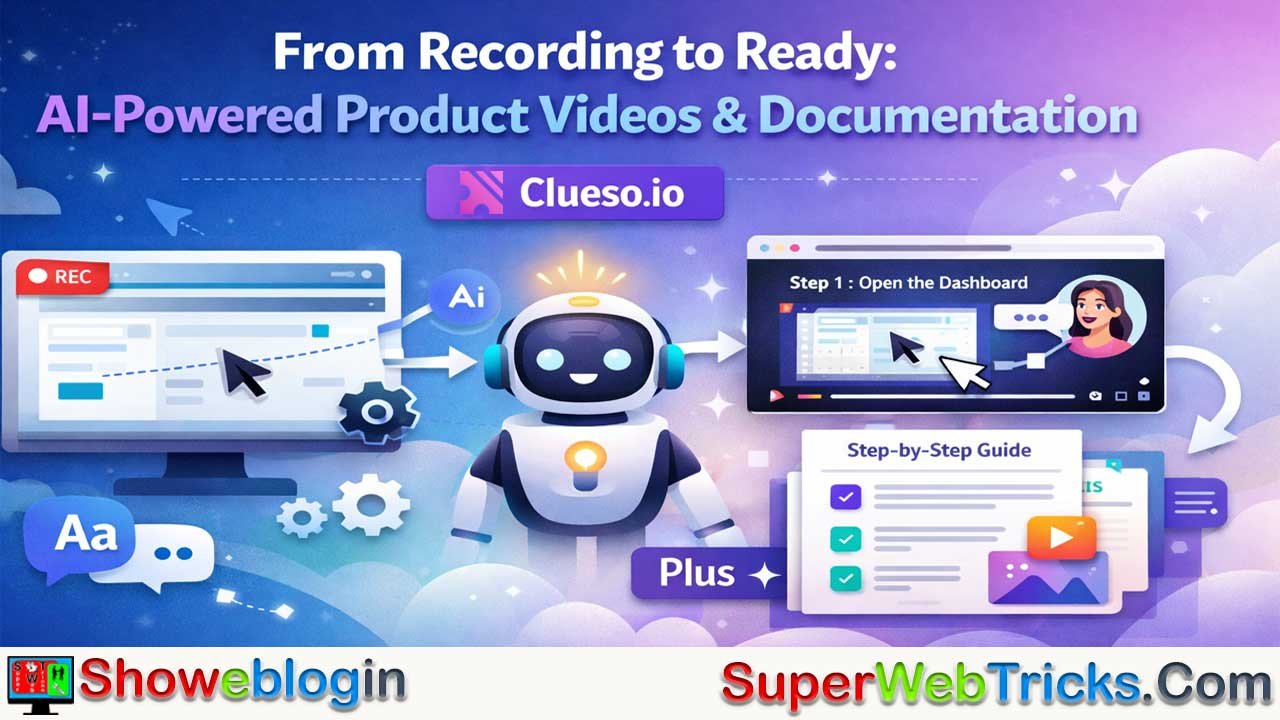






Clueso.io is an AI-first platform that turns a single screen recording or presentation into both a polished, branded product video and a step-by-step written guide in minutes, eliminating the need for separate video production and documentation workflows.
Built for SaaS, customer education, L&D, product, and support teams, it uses AI to generate scripts, voiceovers, visual effects, captions, screenshots, and structured articles that are fully editable and exportable to common knowledge bases.
With features like auto-zoom, smart annotations, AI documentation copilot, multilingual translation, brand kits, and enterprise-grade security, Clueso makes it fast and scalable to create consistent, high-quality software walkthroughs, training materials, SOPs, and help content—all from one source of truth.
| Category | Information |
|---|---|
| Product | Clueso.io |
| What It Is | AI-powered platform that converts screen recordings into polished product videos and step-by-step documentation |
| Core Value | One recording → dual output (video + article), eliminating duplicate work |
| Primary Users | SaaS teams, Customer Education, L&D, Product, Support, Customer Success, Technical Writers |
| Main Use Cases | Product walkthroughs, onboarding, training, SOPs, help center content, feature demos |
| Input Formats | Screen recordings, uploaded videos, slide decks |
| Video Capabilities | AI scripts, AI voiceovers, auto-zoom, visual highlights, captions, branding, timeline editing |
| Documentation Capabilities | Auto step detection, screenshots & GIFs, structured articles, AI editing copilot |
| Editing & Customization | Fully editable scripts, visuals, voice, steps, formatting, brand kits |
| Export Options | Video downloads/links; articles in Rich Text, Markdown, HTML |
| Integrations | Works with Zendesk, Intercom, Notion, and other knowledge bases |
| Localization | One-click translation for videos and articles; glossary support on advanced plans |
| Security & Compliance | Enterprise-grade security, role-based access, SSO/SAML, regional hosting |
| Pricing Model | Subscription-based (Starter, Growth, Enterprise) with free trial |
| Key Differentiator | AI-first, purpose-built for explaining software at scale |
| Ideal For | Teams that repeatedly explain “how to use our product” internally or externally |
Clueso.io: AI-Powered Platform for Product Videos and Documentation
Clueso.io is an AI-first platform that transforms raw screen recordings and presentations into polished product videos and step-by-step documentation in minutes. Instead of spending hours scripting, recording, editing, and formatting, teams can capture a workflow once and let Clueso automatically generate both a studio-style video and a structured article from the same source.
Built for SaaS companies, training teams, and product-led organizations, Clueso is designed to make explaining software fast, scalable, and consistent—without needing traditional video production skills or dedicated technical writers.
What Is Clueso.io?
Clueso is an AI-powered content creation tool that converts rough screen recordings into:
- Polished, branded instructional videos with AI voiceovers, captions, and visual effects
- Detailed, step-by-step articles complete with screenshots, GIFs, and structured text
From a single recording, Clueso automatically generates both formats, so teams no longer have to recreate the same explanation separately as a video and a written guide.
Typical users include:
- Customer education and onboarding teams
- Product marketing and product management
- Customer success, support, and operations
- Learning & development (L&D) and internal training teams
- Technical writers and sales enablement functions
How Clueso Works: From Recording to Ready-to-Share Content
Clueso’s workflow is intentionally simple and repeatable:
- Record or Upload
Capture your screen using the Clueso Chrome extension, or upload an existing screen recording or slide deck. - Let the AI Do the Work
Clueso’s AI analyzes the recording, improves the script, generates a natural-sounding AI voiceover, and enhances visuals with zooms and effects. - Customize to Your Liking
Every element is editable: adjust the script, change the voice, trim or rearrange clips, tweak effects, and refine article steps, screenshots, and formatting. - Export & Share
Download the video, embed it, or share as a link. Articles can be exported in rich text, Markdown, or HTML for use in tools like Zendesk, Intercom, Notion, and other knowledge bases.
This four-step flow is the backbone of the product, whether you’re creating customer-facing tutorials, internal SOPs, or onboarding modules.
Key Video Features
Clueso is built to make professional video production accessible to non-experts while still giving full creative control to teams that want granular editing.
AI-Generated Scripts and Voiceovers
- Automatically generates a clean, professional script based on your original screen recording audio, even from rough takes
- Lets you fine-tune the script, add or remove lines, and adjust phrasing to better match your brand and message
- Offers multiple AI voices with different tones and accents, and automatically syncs narration with on-screen actions
Visual Editing and Smart Effects
- Auto-zoom and visual emphasis highlight key areas of the interface so viewers immediately know where to focus
- One-click visual effects such as arrows, rectangles, spotlights, and blurs help point out important controls while masking sensitive data
- A full video timeline lets you split, trim, reorder, and layer clips, slides, images, transitions, and effects—similar to a traditional video editor, but optimized for product walkthroughs
Captions, Music, and Branding
- Automatically generates captions, which you can style with your brand fonts, colors, and sizes
- Supports advanced caption animations and common export formats like SRT and VTT
- Lets you add background music and sound effects from a library or your own uploads, with precise placement on the timeline
- Provides a brand kit feature to define fonts, colors, logos, and templates once so every video stays on-brand with minimal extra work
Automated Documentation: Articles, SOPs, and Help Content
One of Clueso’s biggest differentiators is that it generates not only a video, but also a detailed article from the same recording.
Automatic Step Detection and Articles
- Detects meaningful user actions in the recording and converts them into numbered, step-by-step instructions
- Automatically captures screenshots for each step, which you can zoom, crop, annotate, blur, or convert into GIFs directly in the article editor
- Produces a fully structured how-to guide or SOP that mirrors the video but also stands on its own as documentation
AI Documentation Copilot
- Includes an AI copilot that lets you refine articles using natural language instructions—merge steps, adjust tone, rewrite sections, or enforce a style guide
- Allows you to set a base prompt or guidelines so future articles automatically follow your preferred structure, tone, and formatting
Export and Knowledge Base Workflows
- Exports articles in rich text, Markdown, or HTML so you can publish them into existing help centers or internal wikis
- Fits naturally into workflows with tools like Zendesk, Intercom, and popular documentation platforms
Translation and Global Reach
Clueso is built with global teams in mind. It supports:
- One-click translation of both voiceovers and captions into a wide range of languages for videos
- One-click translation of articles and SOPs into multiple languages
- Translation glossaries (on advanced plans) so you can control specific product terms and maintain consistency across markets
This makes it practical to localize onboarding, training, and product education content for different regions without creating separate assets from scratch.
Who Is Clueso For?
Clueso targets teams that need clear, repeatable walkthroughs of software, tools, and processes:
- Customer Education & Success
Create help center videos, walkthroughs, and guided tutorials that improve self-service and reduce support load. - Product Marketing & Product Management
Launch new features with polished demos, release-note videos, and “what’s new” explainers backed by matching articles. - Customer Support
Build visual troubleshooting guides and reusable responses that are easier to follow than text-only macros. - Learning & Development (L&D)
Produce onboarding paths, compliance training, and ongoing skill development materials in a fraction of traditional production time. - Operations, IT & Enablement
Document internal tools, policies, and SOPs so teams have a consistent reference for how work gets done. - Technical Writers
Use Clueso to generate a first draft, complete with steps and screenshots, then refine instead of starting from a blank page.
L&D and Training: A Dedicated Use Case
Clueso has a strong focus on learning and development use cases, helping L&D teams create structured training content much faster than traditional methods.
Key capabilities for L&D include:
- Turning screen recordings and presentations into training videos and SOPs
- Automatically breaking long recordings into bite-sized, topic-based clips and job aids
- Maintaining consistency across all training assets through templates and brand kits
- Centralizing videos, SOPs, and job aids in a single workspace so teams can find and reuse content easily
Typical training scenarios include:
- Technical training on internal tools
- New employee onboarding
- Compliance and policy training
- Product knowledge training for customer-facing teams
- Soft skills and leadership development
Documentation at Scale: Clueso vs. Traditional Tools
Traditional documentation and video workflows are slow and fragmented. Teams often:
- Record and edit videos in one tool
- Manually transcribe and clean up audio in another
- Capture and edit screenshots or GIFs separately
- Write and format articles in a knowledge base or CMS
Clueso consolidates this into a single pipeline. From one recording, it produces both a professional video and a fully structured article, with screenshots and visuals automatically attached to each step. This can significantly reduce documentation time, improve consistency, and make it easier to keep content updated as products evolve.
The platform also helps with:
- Eliminating manual video-to-article conversion
- Automating screenshot and GIF capture
- Simplifying maintenance and version control
- Ensuring multi-format export and brand consistency across docs and knowledge bases
Security, Compliance, and Data Protection
Clueso is designed to meet the needs of enterprise buyers who have strict security and compliance requirements.
Key aspects include:
- Industry-standard security certifications and audits
- Hosting on trusted cloud infrastructure with regional data storage options
- Role-based access control and SSO/SAML support on higher plans
- Clear data control, including the ability to permanently delete content and associated data
- A privacy-first approach that does not rely on using customer content to train generic models
This combination makes Clueso suitable for teams operating in regulated or security-conscious environments.
Plans, Pricing, and Trial
Clueso uses a straightforward subscription model with tiers for different team sizes and needs:
- A free trial period that allows teams to test the full workflow before committing
- A Starter plan aimed at smaller teams, starting with a small number of user licenses
- A Growth plan designed for scaling teams that need to produce content regularly
- An Enterprise plan with custom user limits, advanced features like voice cloning and translation glossaries, SSO/SAML, dedicated customer success, and tailored onboarding and training
Both monthly and annual billing options are typically available. For the latest and most precise pricing details, it is best to check the official pricing page on the Clueso.io website.
Continuous Product Evolution
Clueso maintains an active changelog and releases new capabilities frequently. Recent updates have included:
- An AI Documentation Copilot for chat-based article editing
- A redesigned video toolbar and timeline for faster, more intuitive editing
- Transitions, animated captions, and text/image animations
- Templates for reusable branded slides, intros, and thumbnails
- Automatic clipping features to turn long recordings into multiple short videos
- Advanced script editing, auto-sync between voice and video, and expressive AI voiceovers
- Support for custom fonts, avatars, and customizable video players
- Support for inserting images and GIFs into articles, captured directly from video frames
This rapid pace of improvement helps teams stay ahead as video and AI standards evolve.
Why Clueso.io Stands Out
Compared with traditional video editors and classic documentation tools, Clueso brings together several advantages in one platform:
- Dual Output from One Input
A single recording yields both a professional video and a fully structured article, dramatically reducing duplicated effort. - AI-First Experience
Script writing, voiceovers, visual effects, screenshots, GIFs, and translations are all AI-assisted, turning multi-hour workflows into minutes. - Built Specifically for Software Explanation
The feature set, templates, and workflows are tailored to explaining digital products and processes, not generic video content. - Enterprise-Ready
Security features, SSO/SAML, regional hosting, and enterprise support options make it viable for large organizations. - Scales Across Departments
From external customer education to internal training and operations, the same platform can serve multiple teams while keeping branding and style consistent.
For teams that regularly need to explain “how to do X in our product” to customers, employees, or partners, Clueso.io compresses a complex production pipeline into a repeatable, AI-powered workflow that saves time, improves quality, and scales with the organization.
FAQs about Clueso.io
What is Clueso.io?
Clueso.io is an AI-powered platform that converts screen recordings and presentations into polished product videos and step-by-step written documentation from a single source.
Who is Clueso built for?
Clueso is designed for SaaS teams, customer education, L&D, product, support, customer success, operations, and technical writers who regularly explain software or processes.
How does Clueso work?
You record or upload a screen capture, Clueso’s AI generates a video and an article automatically, and you can then edit, brand, export, or share the content.
Can Clueso create both videos and documentation from one recording?
Yes, Clueso’s core value is dual output—one recording generates both a professional video and a structured article without duplicate work.
Does Clueso require video editing or writing skills?
No, Clueso is built for non-experts and automates scripting, voiceovers, visuals, screenshots, and formatting while still allowing full manual control.
What types of videos can be created with Clueso?
Clueso supports product demos, tutorials, onboarding videos, feature launches, training modules, SOP walkthroughs, and internal enablement videos.
What documentation does Clueso generate?
Clueso creates step-by-step articles, SOPs, help center guides, and training documentation complete with screenshots, GIFs, and structured text.
Can I edit the AI-generated content?
Yes, all scripts, voiceovers, visuals, steps, screenshots, and article text are fully editable within Clueso.
Does Clueso support branding?
Clueso includes brand kits for fonts, colors, logos, templates, captions, and layouts to ensure all content stays on-brand.
Can Clueso translate content into other languages?
Yes, Clueso supports one-click translation for videos, captions, and articles, with glossary controls available on advanced plans.
Where can I publish or export Clueso content?
Videos can be downloaded or shared via links, and articles can be exported in rich text, Markdown, or HTML for tools like Zendesk, Intercom, and Notion.
Is Clueso suitable for training and L&D teams?
Yes, Clueso is widely used for onboarding, compliance training, internal tools training, and scalable learning content creation.
How does Clueso compare to traditional video and documentation tools?
Clueso replaces fragmented workflows by combining recording, video editing, documentation, screenshots, and publishing into a single AI-powered pipeline.
Is Clueso secure for enterprise use?
Clueso offers enterprise-grade security, role-based access, SSO/SAML, regional hosting, and strong data control practices.
Does Clueso offer a free trial and paid plans?
Yes, Clueso offers a free trial along with Starter, Growth, and Enterprise plans to support teams of different sizes and needs.












Leave a Reply
You must be logged in to post a comment.