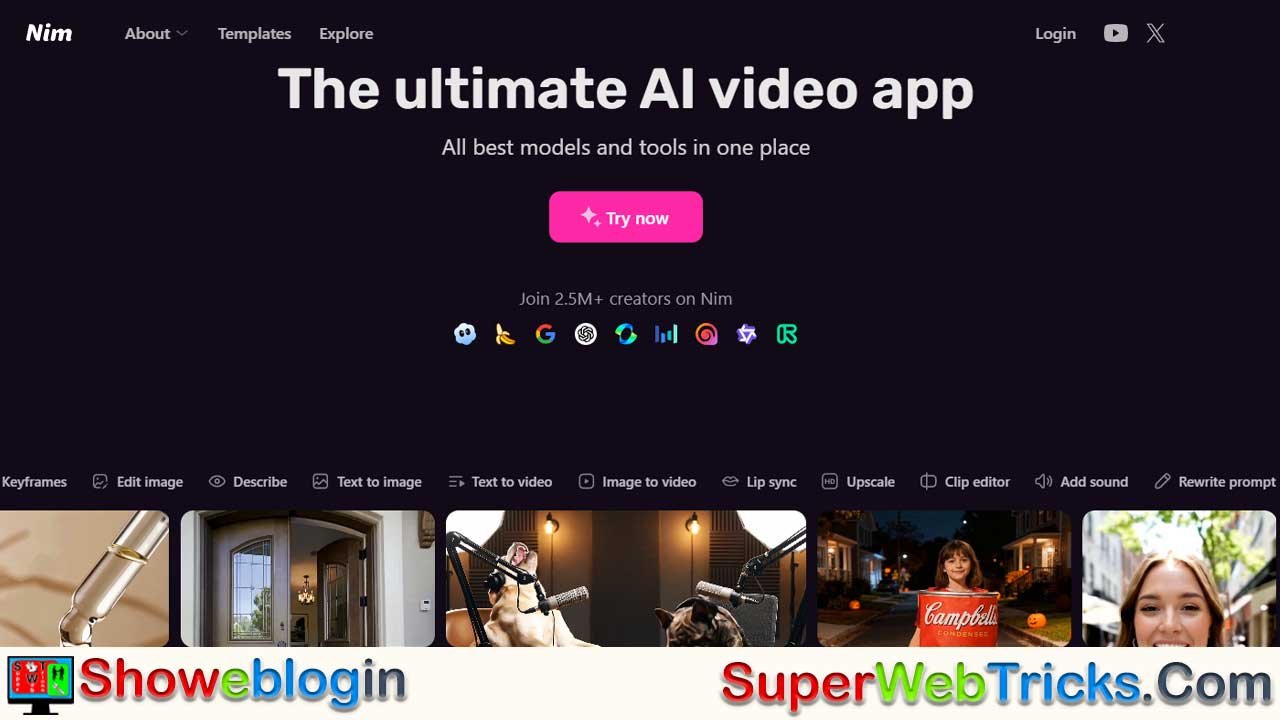






Nim is emerging as the all-in-one control center for AI video creation, unifying top generative models like Veo, Luma, and Pika in a single workflow so creators no longer need to jump between tools.
Its strength lies in seamless model aggregation, professional-grade controls, and high-fidelity asset generation—especially through Nano Banana Pro, which delivers native 4K imagery, accurate text rendering, and consistent characters. Nim adds true filmmaking tools such as precision keyframing, prompt rewriting, image-based “describe” capabilities, lip-syncing, intelligent upscaling, and built-in editing, enabling creators to direct AI rather than rely on randomness.
By consolidating multiple paid services into one subscription, it dramatically reduces costs while boosting production quality, making it an essential platform for the 2.5+ million creators now using it to produce polished, professional AI-driven videos.
| Category | Info |
|---|---|
| Purpose | All-in-one AI video creation and editing platform |
| Core Value | Aggregates top AI models (Veo, Luma, Pika, etc.) into one interface |
| Image Model | Nano Banana Pro for 4K assets, text accuracy, and character consistency |
| Pro Tools | Keyframing, camera control, prompt rewrite/describe engine |
| Post-Production | Lip-syncing, 4K upscaling, clip editing, sound tools |
| User Benefit | Eliminates tool-switching and subscription overload |
| Audience | Creators, filmmakers, advertisers, and studios |
| Pricing Advantage | One subscription replacing multiple expensive AI services |
| Adoption | 2.5M+ creators currently using the platform |
| Positioning | “Adobe Creative Cloud” of the AI video era |
Nim: The Central Nervous System of AI Video Production
The landscape of Generative AI is moving at breakneck speed. For digital creators, filmmakers, and marketers, this speed has created a fragmented ecosystem: you might use one platform for character generation, another for animation, a third for lip-syncing, and a fourth for upscaling resolution. This “tab-switching fatigue” kills creative flow.
Nim has emerged as the definitive solution to this fragmentation. By aggregating the world’s most powerful generative models into a single, cohesive interface, Nim isn’t just an app—it is becoming the Adobe Creative Cloud of the AI era.
Here is an in-depth look at how Nim is standardizing the future of video production.
The Power of Model Aggregation
The primary value proposition of Nim is choice without friction. In the past, if you wanted the specific motion dynamics of Luma Dream Machine or the photorealism of Kling Pro, you needed separate accounts and separate subscriptions.
Nim creates a unified layer over these technologies. It hosts the industry’s heavyweight models—including Veo, Pika, and Luma Ray 2—under one roof.
- Why this matters: Different models have different strengths. One might excel at anime aesthetics, while another is better at photorealistic drone shots. Nim allows users to be “model agnostic,” picking the best underlying engine for each specific shot without leaving the timeline.
Nano Banana Pro: A New Standard for Visuals
A video is only as good as its source imagery. Nim has integrated Nano Banana Pro, a state-of-the-art model that addresses the common pain points of AI imagery: text rendering and anatomical consistency.
- Native 4K: Users can generate assets in ultra-high definition from the start.
- Text Adherence: Unlike older models that struggle with signs or logos, Nano Banana Pro offers superior text rendering, making it ideal for commercial work.
- Character Consistency: This model serves as the perfect “Input Image” for video generation, ensuring that the character you generate in frame 1 looks the same when animated in frame 100.
Beyond the Prompt: Professional Control Tools
Amateur AI video tools often feel like slot machines—you pull a lever (prompt) and hope for a good result. Nim provides the controls necessary for professional storytelling.
Precision Keyframing
Motion in AI video can be unpredictable. Nim’s Keyframe tools allow directors to dictate camera movement. Whether you need a slow pan, a fast zoom, or a specific tracking shot, keyframes give you the ability to direct the AI, rather than letting the AI direct you.
The “Describe” & “Rewrite” Engine
Sometimes the bottleneck isn’t the visual model, but the prompt itself. Nim includes intelligent Prompt Rewriting and Describe features. You can upload a reference image and ask Nim to “describe” it, giving you the perfect text prompt to reverse-engineer that style. Conversely, you can input a basic idea and have the Rewrite engine expand it into a detailed, distinct, and cinematically phrased prompt.
Post-Production: Closing the Loop
Nim understands that a raw video generation is not a finished product. The platform offers a suite of post-production tools to finish the job:
- Lip Syncing: This is often the hardest part of AI video. Nim allows you to upload audio tracks and map them to generated characters with high-fidelity lip synchronization, turning silent clips into speaking roles.
- Smart Upscaling: Most AI video models generate output at 720p or 1080p to save processing time. Nim’s internal upscaler uses AI to hallucinate missing details, bringing footage up to crisp 4K resolution suitable for YouTube, TV, or film.
- Clip Editor & Sound: Basic editing and sound design capabilities are built-in, allowing for rapid prototyping without needing to export to Premiere or DaVinci Resolve immediately.
The Economic Argument: One Subscription, Infinite Potential
For freelancers and agencies, the cost of AI tools adds up. Subscribing to Midjourney, Runway, Luma, and ElevenLabs separately can cost hundreds of dollars a month.
Nim consolidates these costs. By offering access to multiple top-tier models through a single access point, it democratizes high-end video production. It simplifies vendor management for businesses and reduces overhead for independent creators.
Summary: The Verdict
With over 2.5 million creators already utilizing the platform, Nim has moved past the “experimental” phase and entered the “essential” phase. It is currently the most robust bridge between text-to-video novelty and professional video workflows.
For the creator who wants to stop juggling subscriptions and start making movies, Nim is the ultimate destination.
FAQs about Nim
What is Nim?
Nim is an all-in-one AI video production platform that unifies leading generative models in a single interface.
How does Nim differ from other AI video tools?
It aggregates multiple top-tier models, offers pro filmmaking controls, and removes the need to switch between apps.
Which AI models does Nim support?
Nim includes Veo, Luma Ray/Dream Machine, Pika, Kling Pro, Nano Banana Pro, and other industry-leading engines.
What is Nano Banana Pro?
A high-end image generation model that delivers 4K assets, consistent characters, and accurate text rendering.
Why is model aggregation important?
Different models excel at different aesthetics, so combining them lets creators choose the best engine for each shot.
Does Nim support 4K video?
Yes, Nim supports native 4K asset generation and includes upscaling for final video output.
Can Nim maintain character consistency across shots?
Yes, especially through Nano Banana Pro, which creates reliable reference imagery.
What professional controls does Nim offer?
It includes precision keyframing, camera movement control, and detailed prompt rewriting tools.
How does the keyframing feature help creators?
It allows directors to control pans, zooms, tracking shots, and motion paths for predictable animation.
What is the Describe tool?
It analyzes a reference image and generates an optimized text prompt replicating its style and details.
What is the Rewrite tool?
It transforms simple prompts into cinematic, highly detailed instructions for better generation results.
Does Nim include post-production tools?
Yes, including sound integration, clip editing, lip-syncing, and 4K intelligent upscaling.
Can Nim generate lip-syncing video?
Yes, you can upload audio and map it to characters with high-quality, frame-accurate lip movements.
Is upscaling included in Nim?
Yes, Nim’s smart upscaler enhances lower-resolution AI videos to crisp 4K output.
Does Nim replace video editing software?
It includes a lightweight editor for rapid workflows, though full edits can still be refined in Premiere or Resolve.
Who is Nim designed for?
Filmmakers, content creators, marketers, animators, and studios seeking streamlined AI-driven video production.
What are the economic benefits of Nim?
It consolidates multiple costly subscriptions into one affordable plan.
How many creators use Nim?
More than 2.5 million creators currently use the platform.
Can I use Nim for commercial projects?
Yes, it’s widely used for ads, branded content, social media campaigns, and professional productions.
Does Nim support text and logos in generated images or videos?
Yes, Nano Banana Pro significantly improves text accuracy for signage, branding, and product shots.
Is Nim beginner-friendly?
Absolutely—its interface is intuitive, yet powerful enough for advanced workflows.
Does Nim support custom reference images?
Yes, you can upload images to maintain characters, styles, or environments across scenes.
Can Nim be used for animation?
Yes, it supports character animation, motion direction, and lip-syncing for animated storytelling.
Can I generate multiple styles of video?
Yes, from anime to photorealism, fantasy, cinematic, drone shots, and more—based on the chosen model.
Does Nim store project timelines?
Yes, it keeps projects organized so creators can manage multi-shot productions in one place.
Is Nim good for agencies?
Yes, it reduces subscription overhead and speeds up production pipelines for teams and clients.
Do I need technical skills to use Nim?
No technical background is required—creative direction is done through prompts and simple controls.
Does Nim offer prompt optimization?
Yes, both Describe and Rewrite features help produce cleaner, more effective prompts.
Can Nim help with storyboarding?
Yes, you can generate consistent characters and scenes to form a visual storyboard before animating.
Is Nim cloud-based?
Yes, all processing happens online, so no high-end hardware is needed.
Does Nim support audio integration?
Yes, you can upload music, voiceovers, and dialogue for synced or background audio.
Can I export videos directly from Nim?
Yes, you can export at varying resolutions including 4K.
Is Nim suitable for YouTube creators?
Yes, it’s optimized for social media and long-form creators who want fast, high-quality output.
Does Nim allow shot-by-shot control?
Yes, you can direct specific camera movements, timings, and styles for each scene.
Can I mix different models in the same project?
Yes, you can select different engines for different shots to maximize creative flexibility.
Does Nim handle complex visual styles?
Yes, advanced models in the platform can replicate highly specific art directions and cinematic looks.
Is Nim continuously updated?
Yes, new models, tools, and features are added as the AI ecosystem evolves.
Can I use Nim for client deliverables?
Yes, it’s designed for professional-grade output used in commercial environments.
Is there a learning curve?
Minimal—most users understand the workflow within minutes, though deeper tools reward practice.
Can Nim generate both short and long videos?
Yes, from quick clips to multi-scene projects with full narratives.
Does Nim require multiple subscriptions to different models?
No, its main advantage is giving you access to many models under a single subscription.
Can I control style consistency across a whole project?
Yes, through reference images, prompt tools, and model selection, you can match shots precisely.
Is Nim useful for rapid prototyping?
Yes, the built-in editor and fast generation make it ideal for quick concept testing.
What file formats does Nim support?
It supports standard video and audio formats suitable for modern editing and publishing platforms.
Can Nim assist with cinematic shots?
Yes, keyframes let you create slow pans, dramatic zooms, and choreographed movement like a real camera operator.
Does Nim include sound design options?
Yes, basic sound layering and mixing features are included for draft or final edits.
Is Nim considered an industry-standard tool?
It’s rapidly becoming one, widely adopted by creators seeking a unified AI video pipeline.












Leave a Reply
You must be logged in to post a comment.