






The AI video creation landscape has transformed dramatically in 2026. Creating professional, viral-worthy videos no longer requires expensive software, specialized skills, or hours in a video editing suite. The best part? Many genuinely free AI video generators now produce broadcast-quality content without watermarks cluttering your footage.
But here’s the challenge: with dozens of tools claiming to be “free” and “unlimited,” separating legitimate options from subscription traps is critical. This comprehensive guide reviews the 10 most reliable free AI video generators tested in January 2026, covering their real capabilities, actual free tier limits, and best use cases.
Whether you’re a content creator chasing viral TikToks, a marketer building YouTube B-roll, an entrepreneur launching products, or someone just experimenting with AI—this guide reveals which tools actually deliver results without demanding your credit card first.
What Makes a Great Free AI Video Generator?
Before diving into our top picks, understanding evaluation criteria helps you choose intelligently. Here’s what separates exceptional tools from oversold hype:
Truly Free, No Watermark: The most underrated feature. Many “free” tools require payment to remove watermarks, essentially forcing an upgrade. Our selections genuinely export clean, watermark-free videos.
Usable Output Quality: A free tool is worthless if it generates blurry, uncanny, or unusable footage. We prioritized tools delivering 720p-1080p quality that works for professional contexts.
Realistic Credit/Generation Limits: Some tools offer “unlimited” generations but with 4-second clip limits or monthly throttling that makes them impractical. We identified truly unlimited options and those with reasonable restrictions.
Ease of Use: An interface requiring 10 tutorial videos before producing results isn’t actually free—it costs your time. Top-tier tools require minimal learning curve.
Diverse Content Formats: Different creators need different outputs. Text-to-video differs from image-to-video, and some tools handle presentation-style content while others create cinematic footage.
The 10 Best Free AI Video Generators (2026)
1. FlexClip — Best Overall for Ease & Features
Best For: Beginners, YouTube intros, social media content, presentations
Free Tier: Unlimited HD video exports (720p), thousands of templates, no watermark
Paid Upgrade: $9.99/month for 4K exports and premium templates
Why It Wins: FlexClip represents the current sweet spot—genuinely free HD exports with zero watermarks, an extensive template library, and drag-and-drop editing so intuitive that first-time users create polished videos immediately. The AI voiceover generation adds professional narration without additional tools. For creators balancing speed with quality, FlexClip consistently outperforms competitors in user satisfaction and output versatility.
Limitations: 4K resolution requires paid upgrade; some advanced animation effects reserved for Pro plan
Best Use Case: YouTube channel starters, social media managers handling multiple platforms, marketing teams needing fast turnaround
2. Lumen5 — Best for Text-to-Video Conversion
Best For: Bloggers, content repurposing, social media adaptation, educators
Free Tier: 5 videos/month, 720p exports, no watermark, automatic caption generation
Paid Upgrade: Creator plan at $19/month for unlimited videos and 1080p exports
Why It Wins: Lumen5 specializes in transforming written content into video. Paste your blog post or article, and the AI engine automatically selects relevant stock footage, adds transitions, and creates engaging visual pacing. The automatic caption generation is exceptionally accurate, crucial for viral content on muted social feeds. This represents genuine productivity multiplication—converting 1,500-word articles into shareable videos without manual editing.
Limitations: Limited customization compared to full-featured editors; best for text-heavy content; premium library elements require upgrade
Best Use Case: Blog-to-video repurposing, content repurposing across platforms, converting educational articles into learning modules
3. Kapwing — Best for Short-Form Social Content
Best For: TikTok creators, Instagram Reels, meme makers, quick edits
Free Tier: No watermarks, basic editing unlimited, team collaboration (up to 5 members)
Paid Upgrade: Pro at $16/month for advanced features and longer videos
Why It Wins: Kapwing bridges AI-assisted editing and traditional tools. Beyond AI generation, it offers sophisticated quick edits, meme templates, and text tools. The interface feels less intimidating than professional software but powerful enough for serious creators. Team collaboration on the free tier is rare and valuable for creators working with collaborators.
Limitations: Limited AI video generation compared to pure AI generators; strength lies in editing existing footage; not ideal for text-to-video from scratch
Best Use Case: Short-form viral content, editing user-generated content, meme creation, team-based content production
4. Tencent Hunyuan — Best for Cutting-Edge AI Quality
Best For: Cinematic content, product showcase videos, artistic projects, technical users
Free Tier: Text-to-video, image-to-video, 3D animation capabilities, free with account (limited daily generations)
Paid Upgrade: Additional credits available through subscription
Why It Wins: Tencent Hunyuan represents the frontier of AI video generation. This Chinese platform (accessible internationally) produces surprisingly cinematic output with coherent motion, realistic lighting, and natural transitions. The image-to-video capability animates still images with cinematic movement. For creators seeking next-generation quality, Hunyuan delivers results approaching paid Runway or Pika quality entirely free.
Limitations: Interface primarily in Chinese (browser translation sufficient); daily limits prevent unlimited generation; sometimes requires VPN for access outside Asia
Best Use Case: High-end product demos, cinematic B-roll, artistic projects, creators comfortable navigating foreign interfaces
5. Wan Video — Best for Unlimited Generations & Speed
Best For: High-volume creators, rapid prototyping, testing ideas quickly
Free Tier: Unlimited video generations, fast processing (30 seconds to 2 minutes per video), no watermark
Paid Upgrade: Optional premium features, but free tier is genuinely unlimited
Why It Wins: Wan Video solves the fundamental limitation of most “free” tools—generation credits. This platform offers truly unlimited text-to-video generation without signup requirements, creating a rare combination of accessibility and function. Speed matters for rapid iteration and testing multiple concepts. Wan’s 30-second turnaround enables creators to generate dozens of variations quickly, testing what resonates before major production investments.
Limitations: Quality slightly lower than premium tools like Runway; limited customization of video details; interface occasionally sluggish during peak usage
Best Use Case: High-volume ideation, rapid prototyping, creators testing multiple concepts, small businesses generating numerous product videos
6. Grok Imagine (by X/elon Musk) — Best for Artistic & Concept Videos
Best For: Conceptual content, artistic visuals, daily creation cycles
Free Tier: Daily free credits enabling multiple generations per day, artistic quality output
Paid Upgrade: Premium subscription for additional daily credits
Why It Wins: Grok, integrated into the X (Twitter) ecosystem, offers surprising versatility for creators within that community. The artistic output quality rivals much more expensive alternatives. Integration with X means creators can generate videos and immediately publish to their audience without downloading and re-uploading. The daily refresh ensures creators always have free attempts available.
Limitations: Integration with X means best experience for X/Twitter users; daily reset limits rapid iteration; less suitable for business-critical projects; occasional quality inconsistency with complex prompts
Best Use Case: X/Twitter content creators, artistic projects, daily content calendars, concept exploration
7. Qwen AI (Alibaba) — Best for Character Consistency & Lip-Sync
Best For: Avatar videos, talking-head content, character-driven narratives
Free Tier: Free account with daily generation limits, character consistency features, lip-sync synchronization
Paid Upgrade: Credits system for additional generations
Why It Wins: Qwen excels at maintaining character consistency across multiple video generations and realistic lip-sync—critical for avatar-based content, spokesperson videos, and storytelling that maintains character identity. The sophistication rivals paid Synthesia at zero cost. For creators building character-driven content or AI avatars, this represents exceptional value.
Limitations: Primarily Chinese interface (translation required); generating long-form content requires managing multiple segments; daily limits for free users
Best Use Case: AI avatar creation, talking-head presenter videos, character-driven storytelling, educational content with consistent hosts
8. Meta AI (via Llama/Imagine) — Best for Accessibility & Integration
Best For: Meta ecosystem users, casual creators, quick experiments
Free Tier: Free generation through Meta’s AI tools, integrated with Facebook/Instagram ecosystem
Paid Upgrade: Varies depending on implementation; primarily free through Meta products
Why It Wins: Meta’s AI video tools offer unmatched accessibility for the billions within Meta’s ecosystem (Facebook, Instagram, WhatsApp). Integration means creators never leave their native platform to produce content. This removes friction from the creation-to-distribution pipeline.
Limitations: Consistent limitations with Meta rollouts; feature availability varies by region; tied to Meta ecosystem
Best Use Case: Facebook/Instagram creators, businesses leveraging Meta advertising, casual content creators within Meta platforms
9. Adobe Firefly — Best for Quality When Budget Allows
Best For: Adobe Creative Cloud subscribers, professional-quality requirements, short-form clips
Free Tier: Limited free credits enabling 2-3 high-quality video generations, exceptional quality
Paid Upgrade: $9.99+/month Creative Cloud subscriptions unlock more credits
Why It Wins: Adobe Firefly produces the highest-quality video output among free-tier tools. Each generated video, while limited to 5 seconds, exhibits professional cinematography, smooth motion, and sophisticated composition. For creators who can work within 5-second segments (perfect for YouTube Shorts, TikToks, or dramatic B-roll moments), the quality justifies the limitation. Adobe subscription holders get expanded credits.
Limitations: Severe generation limits on free tier (2-3 videos); short clip length (5 seconds) requires assembly; paywalled beyond initial credits
Best Use Case: Short-form video snippets, YouTube Shorts/TikToks, professional cinematography needs, Adobe ecosystem users
10. Runway — Best for Professional Creators & Affordability Hybrid
Best For: Serious creators, professional content, B-roll generation
Free Tier: 125 monthly credits (~5 videos at standard quality), various AI models, professional interface
Paid Upgrade: $15/month for 625 monthly credits
Why It Wins: Runway occupies the sweet spot between free and paid tools. The free tier provides legitimate creative capability, while the $15 upgrade remains remarkably affordable for professionals expecting to use video AI regularly. The interface caters to serious creators without overwhelming beginners. Multiple AI models (Gen-4, Turbo) give users choices balancing speed and quality. Runway’s ecosystem approach—supporting multiple input types and output formats—makes it flexible for various projects.
Limitations: Monthly credit limits prevent truly unlimited generation; most powerful features require paid tier; setup steeper than the most beginner-friendly tools
Best Use Case: Serious hobbyists transitioning to semi-professional work, B-roll libraries, professionals on a budget, creators seeking flexibility and model options
Comparison Chart
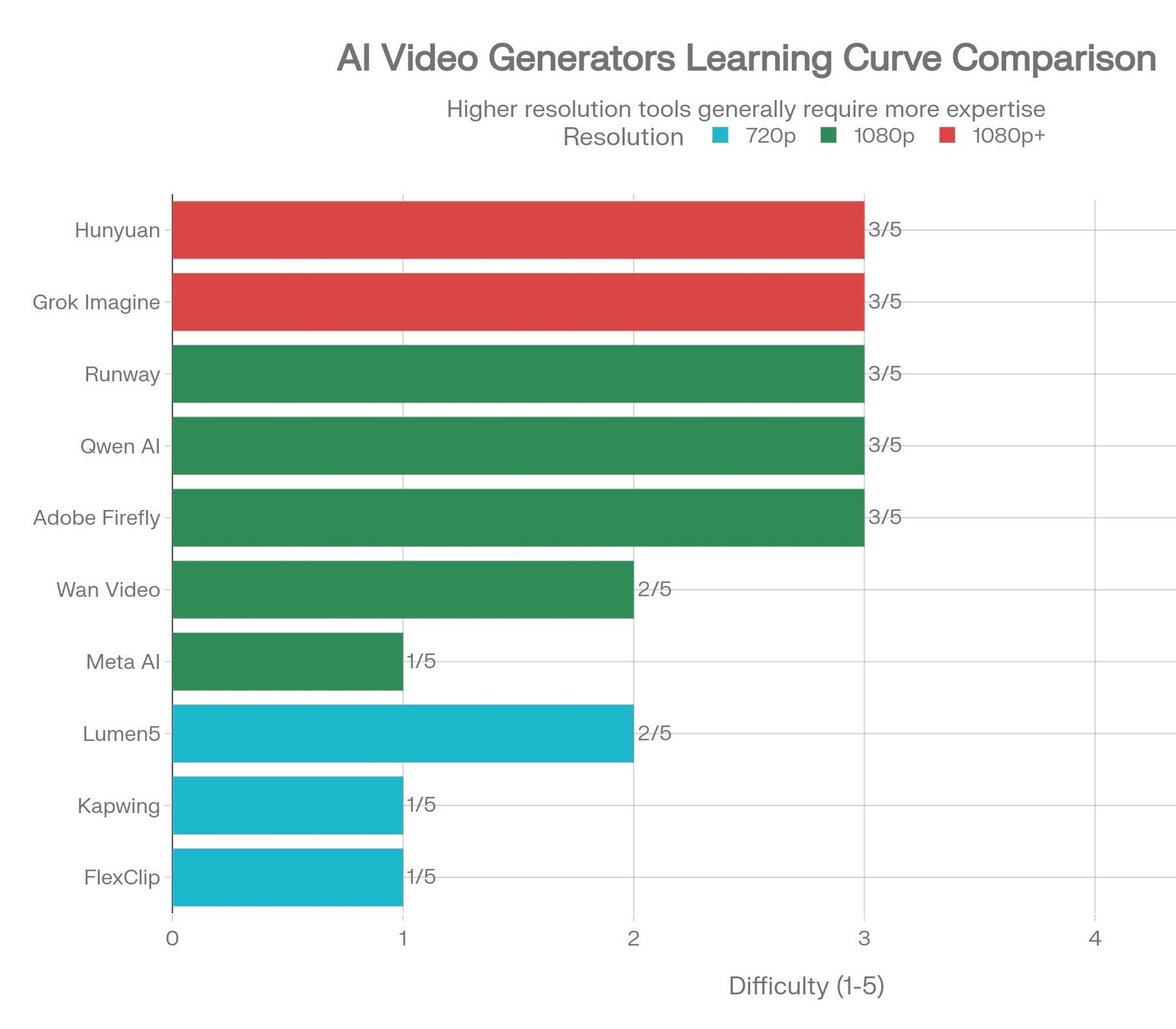
| Tool | Best For | Free Video Limit | Resolution | Watermark | Learning Curve |
|---|---|---|---|---|---|
| FlexClip | Beginners/All-around | Unlimited HD | 720p free | None | Very Low |
| Lumen5 | Blog-to-video | 5/month | 720p | None | Low |
| Kapwing | Short-form social | Unlimited | 720p | None | Very Low |
| Hunyuan | Cinematic quality | Daily limit | 1080p+ | None | Medium-High |
| Wan Video | High-volume creation | Unlimited | 1080p | None | Low |
| Grok Imagine | Artistic projects | Daily free | 1080p+ | None | Medium |
| Qwen AI | Avatar/character | Daily limit | 1080p | None | Medium-High |
| Meta AI | Meta ecosystem | Varies | 1080p | None | Very Low |
| Adobe Firefly | Premium quality | 2-3/month | 1080p | None | Medium |
| Runway | Professional work | 125 credits/month | 1080p | None | Medium |
How to Choose the Right Tool for Your Needs
Your Primary Goal Matters
Creating original cinematic videos from text: Tencent Hunyuan or Wan Video offer unlimited generations at excellent quality. Runway provides the best interface if you prefer more control.
Converting existing content to video: Lumen5 specializes in transforming blog posts and articles into engaging visual content with minimal manual work. FlexClip offers similar capabilities with a more intuitive interface.
Building short-form viral content: Kapwing combines AI assistance with editing tools perfect for TikToks and Reels. For pure generation speed, Wan Video can test dozens of concepts hourly.
Creating branded talking-head content: Qwen AI and Meta AI both handle character consistency and lip-sync, critical for avatar-based or presenter-based video.
Professional quality with budget constraints: Runway’s $15/month upgrade delivers professional-grade results without five-figure software subscriptions.
Maximum accessibility with zero learning curve: FlexClip wins for creators wanting results immediately without tutorials or experimentation.
Experimentation & rapid iteration: Wan Video’s unlimited generation capacity enables testing variants without credit anxiety, essential for discovering what resonates.
Pro Tips for Creating Viral Videos with Free AI Tools
1. Master Prompt Engineering
AI video quality correlates directly with prompt specificity. Vague prompts produce generic results; detailed prompts yield distinctive content.
Weak Prompt: “Make a video about productivity”
Strong Prompt: “Create a 30-second B-roll video of someone working at a modern standing desk in bright morning sunlight, typing on a MacBook, with a coffee cup nearby. Include smooth camera pans and a cinematic color grade with warm tones. Professional, motivational mood.”
Include specific visual details, lighting conditions, emotional tone, camera movements, and duration. Stronger prompts consistently generate superior output across all platforms.
2. Leverage Existing Templates
Even AI-powered tools with templates outperform starting from scratch. Templates provide structural guidance, pacing, and professional transitions. Adapt templates to your brand rather than bypassing them.
3. Generate Multiple Variations
Use unlimited or high-credit tools (Wan Video, Hunyuan) to generate 5-10 variations of the same concept. Different prompts yield different visual interpretations. The best version often emerges through comparison rather than perfectionist iteration of one variant.
4. Combine AI with Human Editing
Free AI tools excel at rapid generation but may miss nuanced timing or transitions. Spend 10 minutes in simple editing (Kapwing, CapCut) adjusting pacing, adding text overlays, or inserting your voiceover. This hybrid approach maximizes AI efficiency while maintaining human creative control.
5. Optimize for Platform-Specific Requirements
YouTube: Embed AI-generated B-roll within longer storytelling; use full HD (1080p); include text overlays for muted viewing
TikTok/Instagram Reels: Vertical 9:16 format, subtitled for sound-off viewing, 15-60 second duration, music-synchronized pacing
LinkedIn: Professional short-form content (30-90 seconds), business context, talking-head format
Facebook: Captions essential; vertical optimized; include call-to-action text
Twitter/X: Short loops (15-30 seconds); text overlay; memetic or trending visual references
6. Use Multiple Tools for Complementary Strengths
No single tool excels at everything. Top creators use Lumen5 for blog-to-video conversion, Runway for cinematic B-roll, and Kapwing for final editing and social optimization. This multi-tool workflow exploits each platform’s strengths.
7. Maintain Brand Consistency Through Custom Elements
AI generation can feel generic. Add consistent brand elements: custom color grades, logo watermarks (on your own content), consistent text styling, voiceover talent, and music. These transforms generated content into branded assets.
8. Time Uploading for Algorithm Advantage
Research indicates videos uploaded when your audience is most active receive initial algorithmic boost. Schedule uploads for 6-9 AM in your audience’s timezone, typically peak engagement periods for most demographics.
FAQ: Everything You Need to Know
Q: Are these tools truly free, or do they need credit cards?
A: FlexClip, Lumen5, Kapwing, Wan Video, and Grok require no credit card for free tiers. Qwen AI, Meta AI, Hunyuan, Adobe Firefly, and Runway require accounts but no payment information for free access. Always verify current terms, as free tier policies shift.
Q: Can I use AI-generated videos commercially?
A: Yes, with caveats. Video generated by these tools is generally yours to use commercially (check individual terms). However, stock footage within videos may carry licensing restrictions. Paid tiers typically offer unrestricted commercial licensing; free tiers sometimes limit commercial use. Review each tool’s specific terms.
Q: How do I remove watermarks from free tiers?
A: Our top 10 tools require no watermark removal because they export clean files. If using other tools that watermark free exports, dedicated watermark removal software (like Unwatermark AI mentioned in some reviews) can help, though this adds workflow complexity.
Q: What’s the best quality I can expect from truly free tools?
A: 720p-1080p resolution is standard. Motion quality, composition, and coherence rival paid tools in 2026. Main limitations are generation frequency (monthly/daily limits) rather than quality per se. Cinematic sophistication approaches professional tools like Runway.
Q: Can I create long-form content (10+ minutes)?
A: Most free tools generate short clips (30 seconds to 2 minutes). For long-form, either assemble multiple generated clips with editing tools or combine AI generation with human footage and traditional editing. This hybrid approach is standard industry practice.
Q: Which tool handles script-to-video most seamlessly?
A: Lumen5 specializes in text-to-video conversion. Paste your script or blog, and it automatically builds visual narrative with stock footage and transitions. For AI-generated visuals matching your script, Qwen AI and Hunyuan offer more cinematic interpretation but require more iteration to match specific narrative arcs.
Q: Do I need to be technical to use these tools?
A: No. FlexClip, Kapwing, and Lumen5 specifically target non-technical users with drag-and-drop interfaces requiring zero coding knowledge. Runway, Hunyuan, and Qwen involve steeper learning curves but remain accessible through documentation and tutorials.
Q: How do these compare to Sora or other OpenAI models?
A: Sora and similar proprietary models generate higher overall quality and longer coherent clips but remain behind paywalls with limited free access. Free tools in 2026 have narrowed the gap significantly for standard use cases. For professional production requiring extended, absolutely flawless content, paid Sora remains superior; for content creation, iteration, and rapid production, free tools suffice.
Conclusion
The democratization of video creation through free AI tools fundamentally changes content creation economics. In 2026, producing professional-quality video no longer requires four-figure software investments, specialized skills, or full-time production teams.
FlexClip wins as the overall best for combining ease, features, and genuinely free HD exports. Lumen5 dominates blog-to-video conversion. Wan Video enables unlimited ideation and rapid iteration. Runway bridges free and professional capability affordably.
The future of content creation belongs to creators who master these tools, not those with the largest budgets. Someone in Kolkata with internet access can generate broadcast-quality content identical to studio productions costing thousands of dollars.
Start with FlexClip or Kapwing if you’re new; experiment with Lumen5 if you have blog content to repurpose; explore Hunyuan or Runway if you’ve used video AI before. Most importantly, begin creating. The best tool for your specific use case emerges through experimentation, not research alone.
The technology is democratized. The opportunity is now.
Additional Resources
Video Optimization for SEO: Embed your AI-generated videos directly in blog posts with descriptive titles and timestamps to boost article rankings and viewer engagement.
AI Avatar Creation: Combine Qwen AI’s character consistency with your personal branding for unique talking-head presenter content.
Content Repurposing: Use Lumen5 to transform your best blog posts into multiple short-form videos across TikTok, Reels, YouTube Shorts, and LinkedIn.
Batch Content Creation: Use Wan Video’s unlimited generation to create 30-day content calendars in single sessions, scheduling uploads for optimal engagement times.












Leave a Reply
You must be logged in to post a comment.